Gminer 3.44: where to download, setup and commands
Gminer 3.44 (March 6, 2024) is the final release; development has stopped. Download, .bat for RVN, ERG and ETC, commands, alternatives. As of October 2026.
Gminer (officially spelled GMiner) is a closed-source miner for NVIDIA and AMD GPUs; its first version came out in September 2018. The latest version is 3.44 from March 6, 2024, and there have been no releases since. This article covers where to download 3.44 safely, how to build a .bat file for pools that still work, which options you actually need, and which miner to move to.
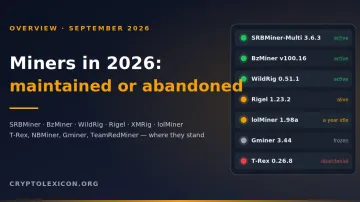
📌 Status as of October 3, 2026: the latest release on the official Gminer GitHub Releases page is 3.44 from March 6, 2024. There has been no new version for more than two and a half years, so we treat development as stopped.
Where Gminer stands now
The last three releases were small, targeted updates:
| Version | Date | What changed |
|---|---|---|
| 3.44 | 2024-03-06 | Dero and Dero + ZIL mining on the K1Pool pool, NVIDIA only, 13 GB+ of VRAM (RTX 3090 and RTX 4090 recommended) |
| 3.43 | 2023-12-08 | KarlsenHash and KarlsenHash + ZIL for NVIDIA |
| 3.42 | 2023-11-13 | improved stability |
In August 2026 the repository received an updated EULA and a new GMiner content and brand policy. These are legal documents: no new miner version was released, and the repository does not publish source code.
What this means in practice:
- New cards. RTX 50xx and RX 9000 came out in 2025, after 3.44. The release notes do not mention them, and no fixes for them will follow.
- New algorithms. Algorithms of coins launched after March 2024 will not appear in Gminer.
- Bugs. If a pool changes its protocol or a new driver breaks the miner, nobody will ship a fix.
- What remains. Version 3.44 is still on GitHub, and 2Miners still publishes Gminer launch lines for RVN, ERG and ETC.
Algorithms supported by Gminer 3.44
The algorithms people still install Gminer for, plus one that is time to forget:
--algo value | Coin | Comment |
|---|---|---|
kawpow | Ravencoin (RVN) | .bat example below |
autolykos2 | Ergo (ERG) | .bat example below |
etchash | Ethereum Classic (ETC) | .bat example below |
kheavyhash | Kaspa (KAS) | listed in the README, 1% fee |
ethash | Ethereum (ETH) | the option is still there, but ETH cannot be mined since September 2022 |
The README also lists Beam (beamhash), Cortex (cortex), Aeternity (cuckoo29) and three Equihash variants: equihash144_5, equihash125_4 and equihash210_9. For Equihash coins, the --pers option sets the personalization string. The release notes for 3.35–3.44 added Radiant, IronFish, KarlsenHash and Dero, plus dual mining with Zilliqa (ZIL). IronFish, KarlsenHash and Dero run on NVIDIA only.
If Gminer does not show KarlsenHash or Dero, the 3.43 and 3.44 release notes suggest forcing the choice with --force_algo karlsen and --force_algo dero.
The developer fee is charged continuously rather than in time slots. Per the README, it is 1% on kHeavyHash, 5% on Cortex and 2% on the other algorithms in the main list. KarlsenHash is 1%, Dero is 5%.
⚠️ Important. Ethereum moved to proof-of-stake in September 2022 (The Merge), and ETH cannot be mined. The examples in the Gminer README still use
--algo ethashand ETH pools. They show syntax, not working settings. Cards that used to mine Ethash are moved toetchash,kawpoworautolykos2.
Source of the list and fees: GMiner by OOO "DevelSoft" — README and release notes.
Step 1. Download Gminer 3.44 from GitHub
In its policy of August 31, 2026, the developer names the Releases section of the develsoftware/GMinerRelease repository as the official download source. "Download Gminer" sites from search ads and builds from forums are not.
- Open the official Gminer 3.44 release page on GitHub.
- Under Assets, download the archive for your system:
gminer_3_44_windows64.zipfor Windows orgminer_3_44_linux64.tar.xzfor Linux. - Check the archive size. The 3.44 release publishes no hashes, so compare at least the size: according to GitHub, the Windows archive is 75,589,276 bytes (about 72 MB).
(Get-Item .\gminer_3_44_windows64.zip).Length
This does not replace a hash check, but it does catch a crude substitution.
🔒 Do not download Gminer from direct links in chats or from mirror sites. Wallet-stealing programs are spread disguised as miners. The only reliable route is the Releases page on GitHub.
For Hive OS, mmpOS and minerstat OS, the 3.44 release notes include ready-made update commands. Copy them from the release page, not from retellings.
Step 2. Extract and prepare the folder
Extract the archive into a folder whose path contains only Latin letters and digits, for example C:\miners\gminer. Non-ASCII characters in the path are a common reason a miner fails to start.
🛡️ Windows Defender often flags miners as threats and deletes
miner.exe. If you downloaded the archive from the release page, add the folder to the exclusions: Windows Defender Blocks Miners: How to Add Folders to Exclusions.
DAG algorithms (etchash, kawpow) need spare virtual memory. With a small Windows page file the miner crashes with an out of memory error. How much to set — Page file for mining: how much to set and how to configure it in Windows.
Step 3. Build the .bat file
The basic launch line:
miner.exe --algo ALGORITHM --server POOL_ADDRESS:PORT --user YOUR_ADDRESS.RIG_ID
pause
miner.exe— the executable from the archive.--algo— the algorithm from the table above.--server— pool address and port. You can also pass the port separately with--port.--user— wallet address, with the rig nameRIG_IDafter the dot (Latin letters, digits,-and_).pause— keeps the window open on an error so you can read the message.
The default worker password is x. You only need --pass if the pool asks for a different one.
How to create the file:
- Create a text document in the miner folder.
- Paste the line and replace the algorithm, pool and wallet with yours.
- Save it and rename the extension from
.txtto.bat. If you cannot see extensions, turn them on in File Explorer.
Ravencoin (RVN) on 2Miners
miner.exe --algo kawpow --server rvn.2miners.com:6060 --user YOUR_ADDRESS.RIG_ID
pause
Ergo (ERG) on 2Miners
miner.exe --algo autolykos2 --server erg.2miners.com:8888 --user YOUR_ADDRESS.RIG_ID
pause
Ethereum Classic (ETC) on 2Miners
miner.exe --algo etchash --server etc.2miners.com:1010 --user YOUR_ADDRESS.RIG_ID
pause
2Miners servers by region, from the pool's help pages as of October 3, 2026:
| Coin | Europe | USA | Asia | SSL port |
|---|---|---|---|---|
| RVN | rvn.2miners.com:6060 | us-rvn.2miners.com:6060 | asia-rvn.2miners.com:6060 | 16060 |
| ERG | erg.2miners.com:8888 | us-erg.2miners.com:8888 | asia-erg.2miners.com:8888 | 18888 |
| ETC | etc.2miners.com:1010 | us-etc.2miners.com:1010 | asia-etc.2miners.com:1010 | 11010 |
💡 Instead of a coin address, 2Miners accepts a BTC or TON address, and payouts then arrive in that coin. Check the payout terms on the pool page before you start.
Key Gminer commands
The full option list is in the README. These are usually enough to run a rig:
| Option | What it does |
|---|---|
--algo, -a | selects the algorithm |
--server, -s | pool address, can be repeated for a backup |
--user, -u | wallet and rig name separated by a dot |
--pass, -p | worker password, x by default |
--ssl 1 | encrypted connection, if the pool supports it |
--list_devices | shows the cards and their numbers |
--devices, -d | mines only on selected cards: --devices 0 2 |
--cuda 0 / --opencl 0 | disables NVIDIA or AMD on a mixed rig |
--templimit, -t | GPU temperature at which the card pauses until it cools down |
--templimit_mem, -tm | the same for memory temperature |
--watchdog, -w | restarts on a crash or lost pool connection, on by default |
--watchdog_mode 1 | reboots the system instead of restarting the miner |
--api | web statistics port, the page opens at http://localhost:PORT |
--logfile, -l | writes the log to a file |
--log_date 1 | adds the date to every log line |
Per-card options take space-separated values, one per card, or a single value for all cards. Gminer has no --log option; logging is enabled with --logfile.
Example with monitoring and overheat protection
miner.exe --algo autolykos2 --server erg.2miners.com:8888 --user YOUR_ADDRESS.RIG_ID --devices 0 1 --templimit 80 --api 10050 --logfile gminer.log --log_date 1
pause
The miner runs on cards 0 and 1, pauses a card at 80 °C, writes a dated log to gminer.log and shows statistics at http://localhost:10050.
⚠️ Important. Do not expose the
--apiport to the internet through router port forwarding. For remote access to the rig, use a VPN: Remote access to your rig and ASICs: Tailscale, ZeroTier and Hive Shell without port forwarding.
Backup pool
If the main pool is unavailable, Gminer switches to the next --server and returns once the main one responds again. Specify a --server and --user pair for each pool:
miner.exe --algo kawpow --server rvn.2miners.com:6060 --user YOUR_ADDRESS.RIG_ID --server us-rvn.2miners.com:6060 --user YOUR_ADDRESS.RIG_ID
pause
Here the backup is another region of the same pool. A second pool is more reliable; how to pick one — How to choose a mining pool: workers, fees and payout schemes.
Encrypted connection
For SSL, use the pool's SSL port and --ssl 1:
miner.exe --algo kawpow --server rvn.2miners.com:16060 --ssl 1 --user YOUR_ADDRESS.RIG_ID
pause
Overclocking from the miner
The --pl, --cclock, --mclock, --fan and --tfan options work on Windows only, and --cclock and --mclock require running as administrator. On NVIDIA, clocks are set as offsets; on AMD, as absolute values in MHz. For beginners it is easier to tune in MSI Afterburner and see the result in the interface: MSI Afterburner: step-by-step GPU overclocking for mining.
Common problems
- The window opens and closes immediately. Add
pauseto the end of the .bat and read the error. The usual causes are non-ASCII characters in the path,miner.exedeleted by the antivirus, or a typo in an option. Full checklist — Miner won't start or crashes immediately: 8 causes and fixes. CUDA error: out of memory (err_no=2). Most often the page file or VRAM is too small for the DAG. Full breakdown — CUDA error: out of memory when mining.- The pool rejects shares. A common cause is memory overclocking. Lower the memory clock and check the server region: Rejected shares: why shares get rejected and how to fix it.
- The miner does not see a card. Run
miner.exe --list_devices. If the card is missing and it is an RTX 50xx or RX 9000, the miner's age is the likely cause. Move to a maintained miner. - A line from an old guide does not connect. Ethereum has not been mineable since 2022, and
--algo ethashlines for ETH do not work. Use the ETC, RVN or ERG line above.
What to replace Gminer with
If your rig runs stably on 3.44 and the pool accepts shares, there is no rush to switch. Switch when you add new cards, update the driver, or want a coin Gminer does not support.
- SRBMiner-Multi runs on NVIDIA, AMD and CPU and is updated often: SRBMiner-Multi: How to Download, Set Up, and Run It (Beginner's Guide).
- Which miners are maintained and which are abandoned — Mining software: which miners are maintained, which are abandoned, and what to install.
To move a .bat file to SRBMiner-Multi, replace the options:
| Gminer | SRBMiner-Multi |
|---|---|
miner.exe | SRBMiner-MULTI.exe |
--algo | --algorithm |
--server | --pool |
--user | --wallet |
--pass | --password |
The same Ravencoin on 2Miners in SRBMiner-Multi:
SRBMiner-MULTI.exe --algorithm kawpow --pool rvn.2miners.com:6060 --wallet YOUR_ADDRESS.RIG_ID --password x
pause
Frequently asked questions (FAQ)
Does Gminer still work? Version 3.44 is available on GitHub, and 2Miners publishes Gminer launch lines for RVN, ERG and ETC. But there have been no updates since March 2024: the miner will not get support for new cards, drivers or algorithms.
Can you mine Ethereum with Gminer? No. Ethereum moved to proof-of-stake in September 2022, and blocks are no longer produced by mining. The ethash option is still in the miner, but it is useless for ETH.
What is Gminer's fee? 2% on most algorithms, 1% on kHeavyHash and KarlsenHash, 5% on Cortex and Dero. The fee is charged continuously rather than in separate time slots.
Where is the official Gminer website? The developer's list of official resources includes the gminer.pro website, Telegram and Discord, but only the Releases page of the develsoftware/GMinerRelease repository on GitHub is named as the download source. Sites offering Gminer downloads outside GitHub are not official.
Will there be new Gminer versions? Unknown. There have been no releases since March 6, 2024, and in August 2026 only legal documents were updated in the repository. Plan your rig as if 3.44 were the final version.
Does Gminer work on RTX 50xx and RX 9000? These cards came out after 3.44, and the release notes do not mention them. Even if the miner starts, there will be no fixes for them. For new cards, use a maintained miner.
Sources
Data checked on October 3, 2026. Cryptolexicon is an independent reference and is not affiliated with the Gminer developer.
- Source: GMiner by OOO "DevelSoft" — GMinerRelease repository README: launch options, algorithms and fees.
- Source: GMiner by OOO "DevelSoft" — release 3.44: March 6, 2024 date, Dero on K1Pool, archive names.
- Source: GMiner by OOO "DevelSoft" — all releases: versions 3.35–3.43.
- Source: GMiner by OOO "DevelSoft" — content and brand policy: official download source.
- 2Miners — help pages for RVN, ERG and ETC: server addresses, SSL ports and Gminer launch lines.
- ethereum.org — The Merge: Ethereum's move to proof-of-stake.
This material is for informational purposes only and is not financial advice. Versions, pool addresses and fees are given as of October 3, 2026 and may change.