SRBMiner-Multi: How to Download, Set Up, and Run It (Beginner's Guide)
SRBMiner-Multi walkthrough: safe download, verifying the file by hash, .bat file structure, key commands and a worked setup example. Updated September 2026.
SRBMiner-Multi is one of the most popular miners among hobbyists and pros alike. It's free, runs on both CPU and GPU — NVIDIA and AMD — and supports a huge list of algorithms. It's a convenient miner for the new coin Pearl (PRL), among many others. This guide covers everything in order: where to download it safely, how to verify the file, how to build a .bat, and which commands a beginner needs.
What SRBMiner-Multi is
It's a mining program developed by an author who goes by doktor83. The "Multi" in the name means one program supports many algorithms and coins — you don't need a separate miner per coin. The miner is closed-source, and in exchange it charges a small developer fee (dev fee) — typically 1–3% depending on the algorithm. The fee means the miner spends a small fraction of its time mining "for the author."
SRBMiner is actively maintained: new versions ship frequently, sometimes several times a month, with new algorithms, optimizations, and fixes.
Step 1. Where to download SRBMiner safely
This is the single most important point for your safety.
Download the miner only from the author's official releases page on GitHub — the doktor83/SRBMiner-Multi repository, Releases section. Don't chase the miner through search ads, and don't grab "ready-made builds" from forums or third-party sites. Malware that steals wallets or mines into an attacker's pocket is very often disguised as miners.
On the releases page, always take the topmost version marked Latest — that's the newest official release. As of publication, that's version 3.6.1 (August 30, 2026), but the version changes often, so don't anchor on a specific number — take the current Latest.
For Windows, download the SRBMiner-Multi-X-X-X-win64.zip archive; for Linux, the ...-Linux.tar.gz.
Step 2. Verify the file by hash (tamper protection)
Each release publishes MD5 hashes of the archives — short "checksums" unique to each file. Verifying the hash guarantees you downloaded the genuine file and not a tampered one.
How to verify on Windows:
- Open PowerShell in the folder with the downloaded archive.
- Run this command (substitute your file's name):
Get-FileHash -Algorithm MD5 .\SRBMiner-Multi-3-6-1-win64.zip
- Compare the resulting string with the hash published on the release page. If they match, the file is authentic. If not, delete it — it's corrupted or altered.
🔒 This step takes half a minute but protects your money. Don't skip it, especially if you didn't download directly.
Step 3. Extract and prepare the folder
Extract the archive into its own folder. Important rule: the folder path must use only Latin letters and digits. Non-Latin characters in the path are one of the most common reasons a miner won't start. Use something like C:\mining\srbminer\.
🛡️ Your antivirus will flag the miner as a threat — that's normal. It happens with almost all miners, because attackers use the same type of program. If you downloaded the file from the official source and verified the hash, add the miner's folder to your antivirus exclusions. Full instructions are in our guide: Windows Defender removes miners: how to add a folder to exclusions.
Step 4. How a .bat file works
The miner launches through a .bat file — a plain text file containing a command. Let's break down its structure with a generic example:
SRBMiner-MULTI.exe --algorithm ALGORITHM --pool POOL_ADDRESS:PORT --wallet YOUR_WALLET.RIG_ID
pause
Part by part:
SRBMiner-MULTI.exe— launches the program itself.--algorithm— which algorithm to mine (e.g.pearlhashfor Pearl,kheavyhashfor Kaspa).--pool— the pool address and port to connect to. You get this from your chosen pool's site.--wallet— your wallet address where coins are paid. After a dot you can add aRIG_ID— a rig name for the stats.pause— keeps the window open if the miner throws an error, so you can read the message.
How to create the .bat:
- In the miner folder, create a text document.
- Paste the command and change the algorithm, pool, and wallet to your own.
- Save, then rename the extension from
.txtto.bat. If you can't see the extension, enable it in Explorer. - Run the
.batas administrator.
Useful SRBMiner parameters (commands)
Here are the commands a beginner most often needs. The full parameter list is in the official Parameters file in the author's repository.
--disable-cpu— disable CPU mining (mine on the GPU only).--gpu-id 0,1— mine only on selected GPUs (by their IDs).--tls true— connect to the pool over a secure channel (needed if the pool requires it).--password x— the worker password (for most pools this is simplyx).--api-enable— enable the miner's stats for monitoring.
💡 Many pools offer a ready-made SRBMiner
.batbuilder right on their site: you enter your wallet address and region, and the site outputs the finished string. For a beginner, that's the safest way to avoid mistakes.
Example: setting up the Pearl (PRL) coin
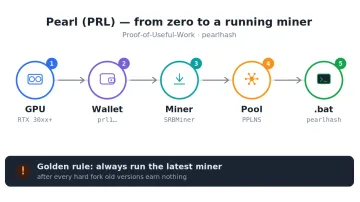
Let's use a specific, popular coin. Pearl is mined with the pearlhash algorithm. Here's a .bat for the 2Miners pool:
SRBMiner-MULTI.exe --disable-cpu --algorithm pearlhash --pool prl.2miners.com:1818 --wallet YOUR_prl1_ADDRESS.rig-1
pause
Here YOUR_prl1_ADDRESS is your Pearl wallet (starts with prl1), and rig-1 is the rig name.
⚠️ A Pearl quirk: this coin changes its algorithm often through hard forks, and after each one old miner versions stop earning. So for Pearl it's critical to always have the latest SRBMiner version. Our dedicated guide to this coin: How to Mine Pearl (PRL) on a GPU.
SRBMiner also supports many other coins and algorithms — Kaspa, Ravencoin, and dozens more. The principle is always the same: change the algorithm, pool, and wallet in the command.
Overclocking through the miner
SRBMiner can apply an overclock directly from the command (parameters like --gpu-cclock for core clock and others). But for a beginner it's easier and clearer to set the overclock through MSI Afterburner, where everything is visible in the interface. We cover a safe general approach separately: MSI Afterburner: overclocking your GPU for mining, step by step.
If SRBMiner won't start
Common causes and fixes:
- The window opened and immediately closed. Add
pauseto the end of the.batto see the error text. Common causes are a non-Latin path, missing recent drivers, or a small page file. - Antivirus deleted the
.exe. Add the folder to exclusions and re-download the miner (see the guide linked above). - Shares are rejected or rewards are zero. Check whether the coin you're mining had an update/hard fork, and update the miner.
- An out-of-memory error. Usually it's the Windows page file — see CUDA error: out of memory while mining.
Full launch checklist: Miner won't start or crashes instantly: 8 causes and fixes.
Frequently asked questions (FAQ)
Is SRBMiner free? Yes, the program is free. But it has a developer fee (dev fee) — typically 1–3% depending on the algorithm. That means the miner spends a small fraction of its time mining for the author.
Is SRBMiner a virus? No. Antivirus tools flag it (and almost all miners) as a threat because miners are also used in malware. If you download from the author's official GitHub and verify the hash, the miner is safe.
Does SRBMiner run on NVIDIA or AMD? Both, plus CPU. Specific support depends on the algorithm: some coins work on both NVIDIA and AMD, others on only one vendor.
Which version should I download? Always the latest (Latest) from the releases page. New versions ship often and include optimizations and support for new coin forks.
Do I need to run it as administrator? It's recommended — the miner runs more reliably and can apply overclock settings.
This material is for informational purposes only and is not financial advice. Mining involves hardware wear and electricity costs.