How to Mine Pearl (PRL) on a GPU: Wallet, Pool, and .bat File
Step-by-step Pearl (PRL) mining on pearlhash: GPU requirements, wallet setup, a ready SRBMiner .bat, choosing a pool and common errors. Updated September 2026.
Pearl (PRL) is one of the most talked-about mining launches of 2026. Unlike most coins, it doesn't make your GPU grind through throwaway hashes — instead your card runs real AI-style computation. That's why people say Pearl made "GPU mining profitable again." This guide takes you from zero to a running miner: what you need, how to set up a wallet, how to build a .bat file, and where to connect.
⚠️ Read this first. The Pearl developers change the algorithm regularly through hard forks — sometimes every week or two. After each one, old miner versions stop earning (the network rejects their shares as invalid). So the golden rule of mining Pearl is simple: always run the latest miner version and watch for announcements. Every version and address in this article is current as of the publication date, but check for a newer update before you start.
What Pearl (PRL) is, in plain terms
Pearl is a Layer-1 blockchain that secures itself with Proof-of-Useful-Work (PoUW). Here's the simple version: ordinary coins make your GPU compute meaningless hashes purely to protect the network, while Pearl makes it perform matrix multiplication — the same math that powers neural networks.
The result is a "two-for-one": the same GPU work both secures the network and produces output useful for AI compute. Pearl's mainnet launched on April 27, 2026. It was built by Pearl Research Labs and is grounded in a peer-reviewed research paper, not a meme. The project also has a partnership with the major AI service Together AI.
The mining algorithm is called pearlhash.
💡 Keep in mind Pearl is a very young, fast-moving coin. Its per-card revenue has already dropped noticeably since launch, and difficulty is climbing. Don't treat any revenue figure as a promise — always calculate profit against your own electricity rate.
Step 1. Check whether your GPU is supported
This is the most important step, and it's where most of the confusion lives, so let's be precise.
Pearl's official node (the full daemon from the developers) requires expensive NVIDIA data-center cards of the Hopper class — H100 or H200. Consumer gaming cards like the RTX 4090 are excluded by the official binary.
In practice, though, regular miners don't use the official node — they use third-party community miners (SRBMiner, PeakMiner, and others) that added support for consumer GPUs. Here's the real picture as of September 2026:
- NVIDIA — the primary and most efficient option. Cards from roughly the RTX 20-series (Turing) and newer are supported, but the RTX 30-series and newer (Ampere, Ada, Blackwell) work best. That's because the algorithm leans on tensor cores, which older cards lack.
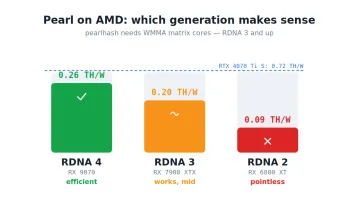
- AMD — support arrived recently. SRBMiner added AMD RDNA support in late August 2026 (versions 3.6.0–3.6.1), and there are separate community miners for Vega, RDNA2, and the 7000/8000 series. Efficiency still trails NVIDIA. See the separate article on mining Pearl on AMD.
- Intel Arc — supported by a few dedicated miners, but a niche choice.
Because it uses tensor cores, Pearl hashrate is measured in terahashes per second (TH/s). The numbers look huge, but comparing them to hashrates on other algorithms is meaningless.
Approximate hashrate by card (at stock or moderate overclock; figures vary between miners, so these are ranges, not a promise):
| GPU | Approx. hashrate |
|---|---|
| RTX 5090 | ~350 TH/s |
| RTX 4090 | ~250–300 TH/s |
| RTX 5080 | ~200 TH/s |
| RTX 4080 | ~180–190 TH/s |
| RTX 5070 Ti | ~170 TH/s |
| RTX 4070 Ti | ~150 TH/s |
| RTX 3090 / 3090 Ti | ~120–140 TH/s |
| RTX 3080 | ~100–108 TH/s |
| RTX 3070 | ~75–80 TH/s |
| RTX 3060 Ti | ~65 TH/s |
| RTX 3060 | ~40–50 TH/s |
⚠️ These are early, indicative numbers that depend heavily on driver, overclock, power limit, and miner version. Network difficulty keeps rising, so real hashrate shifts over time. Check current benchmarks for your specific card.
Step 2. Set up a Pearl wallet
To mine, you need an address where the pool sends your coins. A Pearl address always starts with prl1….
Where to get an address:
- The official Pearl wallet. Download it from the project's official repository. It bundles the node, the wallet, and a command-line tool. You don't need to sync a full node to mine — the wallet only has to generate an address.
- An exchange address. If you'd rather not install any software, a PRL deposit address from an exchange that supports the coin works too (PRL trades on some exchanges under the ticker PEARL). For long-term storage and mining, though, a personal wallet is usually recommended over an exchange address.
🔒 Back up your seed phrase offline. This is the set of words shown when you create the wallet. It's the only way to recover your funds if something happens to your computer. Write it on paper and never share it. Never enter a seed phrase on any website.
Step 3. Download the miner
For a beginner, the most convenient option is SRBMiner-Multi: it's free, supports both NVIDIA and AMD, and is actively updated for Pearl.
Download it only from the official releases page of the author (developer: doktor83) on GitHub. Don't chase the miner through search ads and don't grab "builds" from random sites — malware is frequently distributed disguised as miners.
📌 As of publication, the latest SRBMiner version is 3.6.1 (August 30, 2026). But as noted, the version changes often because of Pearl's hard forks. Always grab the topmost (Latest) release from the releases page.
After downloading:
- Extract the archive (e.g.
SRBMiner-Multi-3-6-1-win64.zip) into its own folder. The folder path should use Latin characters only — non-Latin characters in the path often break the miner. - Verify the file with its hash. Each release publishes MD5 hashes for the archives. This protects against a tampered file. If your downloaded archive's hash doesn't match the published one, the file is corrupted or altered — delete it.
🛡️ Your antivirus will flag it — that's normal. Windows Defender and other antivirus tools almost always mark miners as a threat, because miners are also used in malware. If you downloaded the file from the official source and verified the hash, add the miner's folder to your antivirus exclusions. See our dedicated guide on how to do this safely: Windows Defender removes miners: how to add a folder to exclusions.
Step 4. Choose a pool
Solo-mining a new coin is a lottery — you could wait weeks for a block. That's why almost everyone starts on a pool, which combines everyone's hashrate and pays you a steady share.
Popular Pearl (PRL) pools as of September 2026:
- 2Miners — large and beginner-friendly. Pool fee 1.0% (PPLNS), payouts every 2 hours. It has separate addresses for regular (PPLNS) and solo mining.
- LuckyPool — one of the largest, fee around 1%.
- HeroMiners — a long-running multi-coin pool with PPS+ and solo modes.
- Kryptex — 1% fee, ready-made configs for various miners, HiveOS support.
- PearlHash (pearlhash.xyz) — a pool close to the project itself.
When choosing, look at the fee, whether there's a server near you (lower ping means your shares arrive faster), and the minimum payout.
Step 5. Build your .bat file and start mining
Now let's tie it all together. A .bat file is just a plain text file containing the command that launches the miner.
- Open your extracted miner folder.
- Create a new text document (right-click → New → Text Document).
- Paste in the command (example below).
- Save the file, then rename its extension from
.txtto.bat(e.g.start.bat). If you can't see the extension, enable file extensions in Explorer.
Example command for SRBMiner on the 2Miners pool (regular PPLNS):
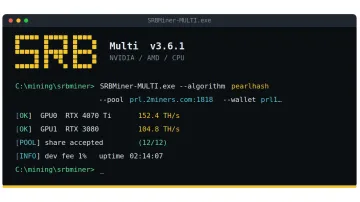
SRBMiner-MULTI.exe --disable-cpu --algorithm pearlhash --pool prl.2miners.com:1818 --wallet YOUR_prl1_ADDRESS.RIG_ID
pause
Example for solo mining on 2Miners:
SRBMiner-MULTI.exe --algorithm pearlhash --pool solo-prl.2miners.com:1919 --wallet YOUR_prl1_ADDRESS.RIG_ID --password x
pause
What to change in the command:
YOUR_prl1_ADDRESS— your real wallet address starting withprl1….RIG_ID— any name for your rig in the pool stats, e.g.rig-1. Latin letters, digits,-and_only, max 32 characters. This field is optional.--disable-cpu— turns off CPU mining so you mine on the GPU only (correct for Pearl).- If the pool requires a secure connection, add
--tls true.
💡 Most pools offer a "BAT file example" field or a command builder: you enter your address and region, and the pool generates the full string for you. It's the safest way to avoid a typo in the pool address or port.
Now run the .bat file as administrator (right-click → Run as administrator). A black miner window opens. Within a few seconds you'll see the miner connect to the pool and start submitting shares. Your worker will appear in the pool's stats within a minute.
Overclocking and tuning (in brief)
Once mining works, you can raise hashrate and cut power draw with an overclock in MSI Afterburner. For pearlhash, people typically raise the core clock and cap the power limit, touching memory less than on other algorithms. Exact values depend on the card. We cover a safe general approach in a separate guide: MSI Afterburner: overclocking your GPU for mining, step by step.
Some miners have extra flags for specific cards — for example, SRBMiner has a --pearl-k2 parameter for a range of cards (3070, 3070 Ti, 4070 Ti, 5070 Ti and others) that enables an alternative kernel allowing higher clocks. Try it if you want to squeeze out the maximum.
If the miner won't start or isn't earning
Common problems specific to Pearl:
- The miner runs but shares are rejected, or rewards are zero. The first thing to check is whether there's been a hard fork. If the algorithm was updated and you're on an old version, the network will reject all your shares as invalid. The fix is to download the latest miner version.
- Antivirus deleted the miner file. Add the folder to exclusions (see the guide linked above) and re-download the miner.
- The miner closes immediately after launch. Common causes are non-Latin characters in the folder path, missing recent NVIDIA drivers, or a small page file. See our detailed guide: Miner won't start or crashes instantly: 8 causes and fixes.
- A GPU memory error. This is usually not the card itself but the Windows page file — see the guide CUDA error: out of memory while mining.
Frequently asked questions (FAQ)
Can I mine Pearl on an AMD GPU? Yes, with caveats. AMD support arrived recently (in SRBMiner from versions 3.6.0–3.6.1, late August 2026, for RDNA cards), and there are separate community miners for Vega and the 7000/8000 series. Efficiency trails NVIDIA because the algorithm is optimized for tensor cores.
Why did my hashrate suddenly drop or my rewards disappear? Most likely a Pearl hard fork changed the algorithm. Old miner versions submit invalid shares afterward. Update the miner to the latest version.
What's the minimum GPU I need? In practice, community miners support cards from roughly the RTX 20-series, but comfortable mining starts at the RTX 30-series and newer. The newer the architecture and the more tensor cores, the higher the revenue.
How much can I earn? There's no exact number: revenue depends on the PRL price, network difficulty, and your electricity rate. Pearl's per-card revenue has already dropped noticeably since launch. Always calculate profit as "revenue minus electricity cost" for your own rate, not from marketing figures.
Solo or pool? For a single card, use a pool. Solo-mining a new coin can mean weeks of waiting for a block, whereas a pool pays a steady share.
Do I have to run it as administrator? It's recommended — that way the miner can access overclock settings and runs more reliably.
This material is for informational purposes only and is not financial advice. Mining involves hardware wear and electricity costs; assess the risks yourself.