How to mine Quantus (QTC) on a GPU: miner, pool, wallet
Quantus (QTC) GPU mining on Windows: SRBMiner-Multi 3.6.4 or quantus-miner, a pool over QUIC, rewards and first-day errors. Current as of September 2026.
Quantus is a new GPU-mineable coin built on post-quantum cryptography, and its mainnet went live on September 9, 2026. For the first weeks the only way to get QTC is to mine it, which is why it is getting attention. This guide covers what the network is, how its mining differs from the usual stratum setup, how to run the miner on Windows, connect to a pool and where the rewards go.
What Quantus is and how it differs
Quantus (ticker QTC) is a Substrate-based Layer-1 with QPoW consensus (Quantum Proof of Work). The hash function is Poseidon2, signatures use post-quantum ML-DSA-87 (Dilithium). The project pitches itself as "quantum-secure money": keys and signatures are not breakable by Shor's algorithm.
What matters for a miner:
- Mainnet launched on September 9, 2026. Before that the network ran on the Planck testnet with the test ticker QUAN. Planck is retired; its history and rewards do not carry over.
- Mine-only at launch. The team stated the coin cannot be bought for the first weeks — only mined. Liquidity is promised later.
- No stratum. The miner talks to a node or pool over QUIC on top of UDP. The usual
stratum+tcp://endpoints do not exist here. - Two miners. The official
quantus-minerfrom the project team (open source, Rust, GPU via Vulkan) and SRBMiner-Multi, which added aquantusalgorithm for NVIDIA and AMD RDNA in version 3.6.4. Gminer, lolMiner and others do not support it at the time of publication. - Solo rewards go to a wormhole address — a special address derived from your seed phrase. On a pool, payouts go to a regular wallet address.
⚠️ Important. The QTC ticker is also used by a different coin — Qubitcoin (Qhash algorithm). They are separate projects with separate miners and pools. On calculators and exchanges, make sure you are looking at Quantus, not Qubitcoin.
Official site — Quantus, source code — GitHub.
What you need before you start
| Component | Requirement |
|---|---|
| GPU | Any current NVIDIA generation or AMD RDNA. The official miner needs a Vulkan driver; SRBMiner runs on CUDA/OpenCL |
| OS | Windows 10/11 (native build), Linux, macOS. WSL2 also works on Windows |
| Network | Outbound UDP to the pool port. If your router or ISP blocks UDP, the miner will loop on reconnecting |
| Wallet | Quantus Wallet (iOS/Android) or the quantus-cli command-line tool |
| Antivirus | An exclusion for the miner folder in Windows Defender |
🛡️ Windows Defender will almost certainly delete
SRBMiner-MULTI.exeorquantus-miner.exeon extraction. Add the folder to exclusions first — see the guide on Defender exclusions.
Step 1. Wallet and payout address
The easiest path is the mobile Quantus Wallet (iOS and Android, links on the wallet page). Create a wallet, write down the recovery phrase, copy the address from the home screen. Quantus addresses start with qz….
For a rig with no phone there is the quantus-cli tool:
quantus wallet create --name pool
quantus wallet export --name pool --format mnemonic --output seed.txt
The first command prints your qz… address, the second saves the seed phrase to a file.
🔒 A regular Substrate wallet or subkey will not work. Quantus uses post-quantum keys; the network rejects addresses from a Polkadot-style wallet. Keep the seed phrase offline — there is no other way to recover the wallet.
If you plan to solo mine you need a different address — a wormhole address. See step 5. For a pool, a regular qz… address is enough.
Step 2. Choose and download a miner
At the time of publication two miners support the Quantus algorithm.
| SRBMiner-Multi | quantus-miner (official) | |
|---|---|---|
| Version | 3.6.4 and newer | 4.x (v4.0.0 — August 2026) |
| Fee | 2.5 % | 0 % |
| GPUs | NVIDIA, AMD RDNA | NVIDIA, AMD via Vulkan |
| OS | Windows, Linux, HiveOS (custom miner) | Windows, Linux, macOS |
| Best for | People already on SRBMiner who want the familiar logs, watchdog and command-line overclocking | People who want zero fee or mine solo through their own node |
SRBMiner-Multi. The quantus algorithm arrived in version 3.6.4 (September 2026) together with the --tls-cert-sha256 parameter for the QUIC protocol. Download from GitHub — Releases, take Latest. For HiveOS the same release includes a custom build, srbminer_custom-3.6.4.tar.gz; parameters go into "Extra config arguments" by hand. Basic SRBMiner setup is covered in a separate guide.
quantus-miner. The official miner from the Quantus-Network/quantus-miner releases. Version 4.0.0 shipped in August 2026 and, per the team, made GPU mining roughly 4x faster than v3. Always take Latest: releases come out often after launch. The official miner has a built-in benchmark:
quantus-miner gpu-list
quantus-miner benchmark --duration 30
After 30 seconds it prints your hashrate — write it down to compare with what the pool reports.
Whichever miner you pick, extract it into a folder without spaces or non-Latin characters, e.g. C:\miners\quantus\.
💡 The two miners may hash differently on the same card — the network is new and optimizations land weekly. Run each for 15–20 minutes on a pool and compare, keeping the 2.5 % fee in mind.
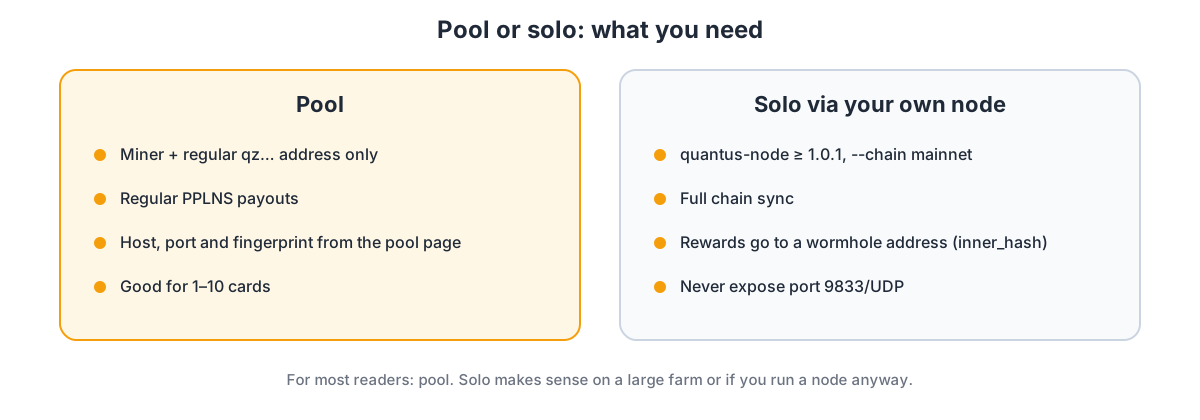
Step 3. Pool or solo
| Pool | Solo | |
|---|---|---|
| What you need | Miner + address only | Node (full sync) + miner |
| Payouts | Regular, PPLNS | Only when you find a block yourself |
| Address | Regular qz… | Wormhole address |
| Who it is for | 1–10 cards | Large farms or people who want to run a node |
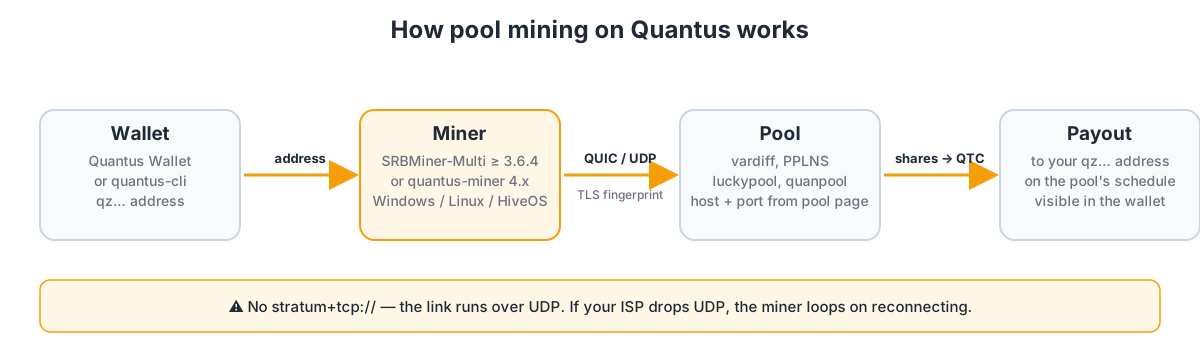
For most readers the answer is a pool. Known pools at the time of publication:
- LuckyPool — vardiff, per-worker stats, adjustable payout threshold, solo mode through the pool.
- quanpool — PPLNS, hourly payouts, pinned server certificate.
The general selection criteria — fee, payout threshold, pool share of the network — are the same as for any coin and are covered in how to choose a mining pool. For a brand-new network add one more: do not hand a single pool more than half of the network hashrate.
📌 Status as of September 10, 2026: the network is on its second day and the pool list will grow. Check pool pages — server addresses, ports and tokens can change between releases.
Step 4. Running the miner on Windows
A pool connection needs three values: the server address, the pool's TLS certificate fingerprint and, for the official miner, an auth token. All of them are copied from the pool page ("Start mining" / "Getting started" tab) — the pool inserts your address and worker name into a ready-made command.
Option A. SRBMiner-Multi
Create start.bat in the miner folder:
@echo off
cd /d %~dp0
SRBMiner-MULTI.exe --algorithm quantus --pool POOL_HOST:PORT --wallet YOUR_ADDRESS --password RIG_ID --tls-cert-sha256 FINGERPRINT_FROM_POOL_PAGE --disable-cpu
pause
Where YOUR_ADDRESS is your qz… address, RIG_ID your worker name, POOL_HOST:PORT and FINGERPRINT_FROM_POOL_PAGE come from your pool dashboard. The exact pool string format (with or without a prefix) and where the worker name goes are shown in the pool's own SRBMiner example — follow that, not this article.
Everything else is standard: --gpu-id to pick cards, --gpu-plimit / --gpu-cclock for NVIDIA overclocking, --disable-cpu so the miner leaves the CPU alone.
Option B. quantus-miner
@echo off
cd /d %~dp0
:loop
quantus-miner serve --node-addr POOL_HOST:PORT --auth-token TOKEN_FROM_POOL_PAGE --tls-cert-sha256 FINGERPRINT_FROM_POOL_PAGE --cpu-workers 0
timeout /t 10
goto loop
Since v4 the miner–node channel is authenticated, so without --auth-token and --tls-cert-sha256 the connection will not come up. The payout address is usually encoded in the token rather than passed as a flag. The :loop restarts the miner after a crash; --cpu-workers 0 disables CPU mining — by default the miner takes every core but two.
Useful flags of the official miner:
| Flag | What it does |
|---|---|
--cpu-workers N | Number of CPU threads. 0 — GPU only |
--gpu-devices N | Use the first N cards. Omit to use all |
--gpu-throttle-ms N | Pause between batches in ms. Cuts heat and power; 0 — flat out |
--allow-integrated | Allow the integrated GPU when a discrete card is present |
-v | Verbose logs when something looks off |
Every flag has an environment variable: MINER_CPU_WORKERS, MINER_GPU_DEVICES, MINER_GPU_THROTTLE_MS, MINER_VERBOSE.
💡 On some pools, solo vs pool is chosen by the port, not by a miner flag. Check which port maps to which mode on the pool page.
After launch the log should show a pool connection and the first job. The hashrate will bounce for the first minutes — that is the pool's vardiff settling on your card.
Step 5. Solo mining with your own node
If you want to run your own node, here is the order.
- Download
quantus-nodev1.0.1 or newer from theQuantus-Network/chainreleases. Older builds do not include the mainnet chain spec. - Generate a wormhole key:
quantus-node key quantus --scheme wormhole
The command prints Address (rewards land here) and inner_hash — a 32-byte preimage you pass to the node. If you want rewards visible in the mobile wallet, derive the wormhole key from the same seed phrase as the app: the balance then shows up in the wallet automatically, no separate claim.
- Start the node with the external miner port:
quantus-node --validator --chain mainnet --miner-listen-port 9833 --rewards-inner-hash YOUR_INNER_HASH --sync full --max-blocks-per-request 64
- Wait for full sync (
Imported #…in the log catches up with the network height) and start the miner:
quantus-miner serve --node-addr 127.0.0.1:9833 --cpu-workers 0
⚠️ Important. The miner port (
9833/UDP) is a private channel with no built-in protection in older versions. Never forward it to the internet. Only the P2P port30333should be publicly reachable.
🛡️ On Windows the native node stalls on sync if Defender scans the database. Add the data folder to exclusions from an elevated PowerShell:
Add-MpPreference -ExclusionPath "$env:USERPROFILE\.quantus".
Hashrate and what to expect
It is too early for exact per-card numbers: the network is on its second day and miner v4 is less than a month old. Before v4 the official guide pointed at hundreds of MH/s from a single modern card; v4 claims roughly a 4x gain. The only honest way to know your hashrate is quantus-miner benchmark on your own card.
Known performance quirks:
- The official miner runs on Vulkan; SRBMiner uses CUDA/OpenCL. On Linux with NVIDIA, CUDA builds (SRBMiner,
quanpool-miner) are usually faster than the stock miner. - Early v3 versions of the official miner dropped RTX 50-series cards into a generic fallback path and delivered hashrate several times below expectations. v4 should fix this — if not, update and check the repository issues.
- A laptop with integrated graphics may show an odd device count (e.g. "5 / 0"). Pass
--gpu-devices 1explicitly.
Overclocking follows the usual pattern: Poseidon2 loads the core, not memory, so start with a power limit and a small core offset. The basics are covered in the MSI Afterburner guide.
Common problems
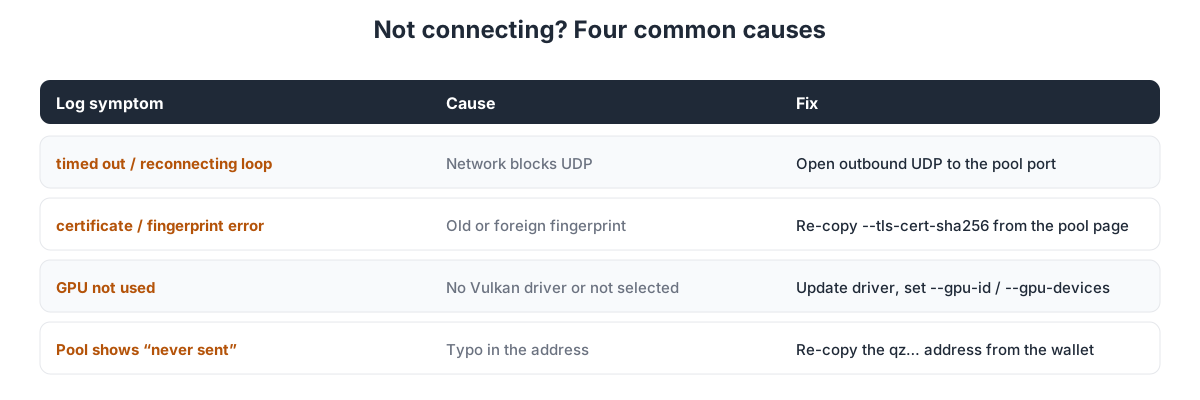
timed out and reconnecting in a loop. The pool speaks QUIC/UDP and your network blocks UDP. Check outbound UDP to the pool port on the firewall and router. Corporate networks and some mobile carriers drop UDP.
Miner does not see the card. In the official miner run quantus-miner gpu-list; in SRBMiner check the device list at startup. If the card is missing, update the driver (the official miner needs Vulkan). If it is listed but unused, select it explicitly: --gpu-devices N or --gpu-id N.
certificate or fingerprint error. The --tls-cert-sha256 value does not match the pool's certificate. Re-copy it from the pool page — an old or foreign fingerprint is refused.
Pool shows "never sent" while the miner is running. The address in your command and the one you look up on the pool differ by at least one character. The pool does not fix typos, it rejects the address. Re-copy it from the wallet.
Hashrate dropped right after start. That is vardiff. Wait 5–10 minutes for the difficulty to settle.
Many rejected shares. Same causes as everywhere: stale jobs, unstable network, aggressive overclock. See the rejected shares guide.
Miner closes right after launch. Most often antivirus or a missing Vulkan driver. The general checklist is in miner won't start.
Economics and risks
At the time of publication QTC has no market price: the team announced the coin is mine-only for the first weeks, with liquidity coming later. Pool calculators show coin amounts only, no fiat.
SafeTrade lists a QUAN-USDT pair. QUAN was the Planck testnet ticker, so before any trade verify with the exchange which asset is actually traded and whether it belongs to mainnet. Until the team itself announces a listing, treat any pair with caution.
Network difficulty in the first weeks after launch climbs fast: testnet miners move to mainnet and pools release optimized builds. The hashrate share you start with and the one you have in a month are different numbers.
Frequently asked questions (FAQ)
Can I mine Quantus with SRBMiner, Gminer or lolMiner? SRBMiner-Multi — yes, since version 3.6.4 (quantus algorithm, 2.5 % fee). Gminer and lolMiner do not support it at the time of publication.
Why is there no stratum address? The miner protocol is built on QUIC over UDP with TLS. The pool gives you a host, port, token and certificate fingerprint instead of the usual stratum+tcp:// string.
What is a wormhole address and why do I need it? An address derived from a 32-byte preimage (inner_hash). The chain only credits solo rewards to such addresses, for privacy. On a pool you do not need one — payouts go to a regular address.
Can I mine on a CPU? With the official miner, yes: --gpu-devices 0 disables the GPU, --cpu-workers N sets the threads. SRBMiner lists the algorithm for GPUs only. Either way the gain next to GPUs is symbolic.
Is AMD supported? Yes: the official miner via Vulkan, SRBMiner on RDNA cards (RX 5000 and newer). Older GCN cards are not listed for SRBMiner.
Where did my rewards go if I mined on the Planck testnet? Nowhere: Planck is a separate network and its balance does not carry over to mainnet.
Where do I look at blocks? The official explorer is explorer.quantus.com; the community also uses alternative explorers.
This material is for informational purposes only and is not financial advice. The network launched days ago — verify miner versions and pool endpoints before you start.