Rejected shares: why shares get rejected and how to fix it
What rejected shares mean in mining, what percentage is normal, how stale, invalid and duplicate shares differ, and how to reduce rejects step by step.
Let's break down what rejected shares are, what percentage counts as normal, how stale, invalid, and duplicate differ — and, most importantly, a step-by-step plan to cut rejects and stop losing money.
Updated: 2026-08-31 · Reading time: ~9 minutes
#mining #errors #overclocking #pools
Contents
- What a share is, in plain terms
- The three types of rejected shares — and why telling them apart matters
- What reject percentage is normal
- How much money you're actually losing
- Cause 1: memory overclock too aggressive
- Cause 2: a poorly chosen pool
- Cause 3: internet problems
- Cause 4: outdated miner version
- Cause 5: hardware (risers, power, card degradation)
- Cause 6: system clock out of sync
- Diagnostic order: what to check step by step
- When rejects aren't your fault
- Conclusion
1. What a share is, in plain terms
When you mine in a pool, your graphics card doesn't search for a whole block — that would take far too long on its own. Instead, the pool hands you simpler tasks, and you send the solutions you find back to it. Such a solution is called a share.
Then one of two things happens:
- Accepted share — the pool accepted the solution. It's counted, and you'll be paid for it.
- Rejected share — the pool rejected the solution. The card's work was wasted, and there's no money for it.
That's exactly why rejects hit your wallet directly: electricity was spent, the card ran hot, and there's no earnings to show for it.
2. The three types of rejected shares — and why telling them apart matters
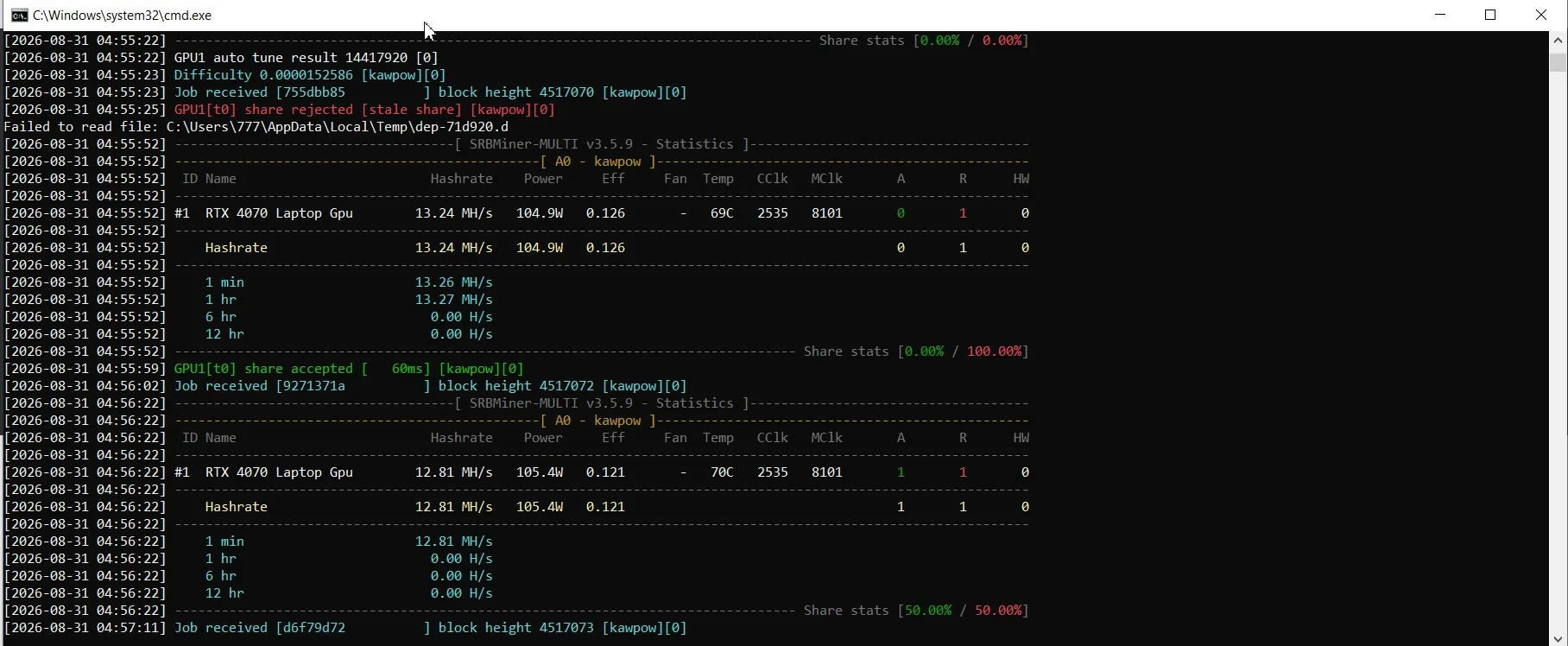
This is the key point most guides skip. Different types of rejects mean different problems, and they're fixed in different ways. First identify your type, then fix it.
Stale shares — the most common type. You sent a solution, but the pool had already found the block earlier — your answer arrived too late. The cause is almost always latency: a slow or distant pool, or internet problems.
Invalid shares — the solution arrived on time, but it's wrong. The card computed it with an error. The cause is almost always hardware or overclocking: over-tightened memory, a bad riser, weak power delivery.
Duplicate shares — a solution was sent that's identical to one already submitted. This usually points to a configuration or software glitch in the miner.
💡 Remember a simple rule: stale → fix the connection and the pool. Invalid → fix the overclock and the hardware. This will save you hours of pointless experimenting.
3. What reject percentage is normal
Understand this up front: zero rejects don't exist. It's physically impossible — there's always latency in the network, and someone always finds the block first. If a pool shows exactly 0%, it most likely just doesn't display stale shares in its statistics.
Benchmarks:
- under 1% — excellent, nothing to do;
- 1–2% — fine, you can optimize a bit;
- 2–5% — there's a problem, worth looking into;
- over 5% — something is definitely wrong, you're losing noticeable money.
4. How much money you're actually losing
A rough estimate to get a sense of the scale. If you consistently have 5% rejects, then roughly every twentieth share is wasted — and you pay in full for the electricity behind that work. As a first approximation that's about 5% of income left on the table: on a notional $100 a month, somewhere around $5.
A caveat: the exact loss depends on the pool's payout scheme (PPS, PPLNS, and others treat stale shares differently), so the figure is a ballpark, not a precise number. But even as an approximation it makes the point: over a year it adds up noticeably, and rejects aren't a cosmetic issue — they're a direct loss.
| Rejects | $15/mo | $30/mo | $50/mo | $100/mo | $200/mo |
|---|---|---|---|---|---|
| 0.5% | $0.07 | $0.15 | $0.25 | $0.50 | $1.00 |
| 1% | $0.15 | $0.30 | $0.50 | $1.00 | $2.00 |
| 2% | $0.30 | $0.60 | $1.00 | $2.00 | $4.00 |
| 5% | $0.75 | $1.50 | $2.50 | $5.00 | $10.00 |
| 8% | $1.20 | $2.40 | $4.00 | $8.00 | $16.00 |
Estimate under PPS payout; PPLNS figures are close. Income is gross, before electricity. Monthly loss = income × reject rate.
5. Cause 1: memory overclock too aggressive
The most common cause of invalid shares. By overclocking the card's memory you raise the hashrate — but past a certain threshold the card starts computing with errors. On the surface everything looks fine, the hashrate is high, yet half the work is sent to the trash.
The tricky part: the miner keeps showing high numbers, you think everything's great, but in reality you're earning less than you would at more modest settings.
How to fix it:
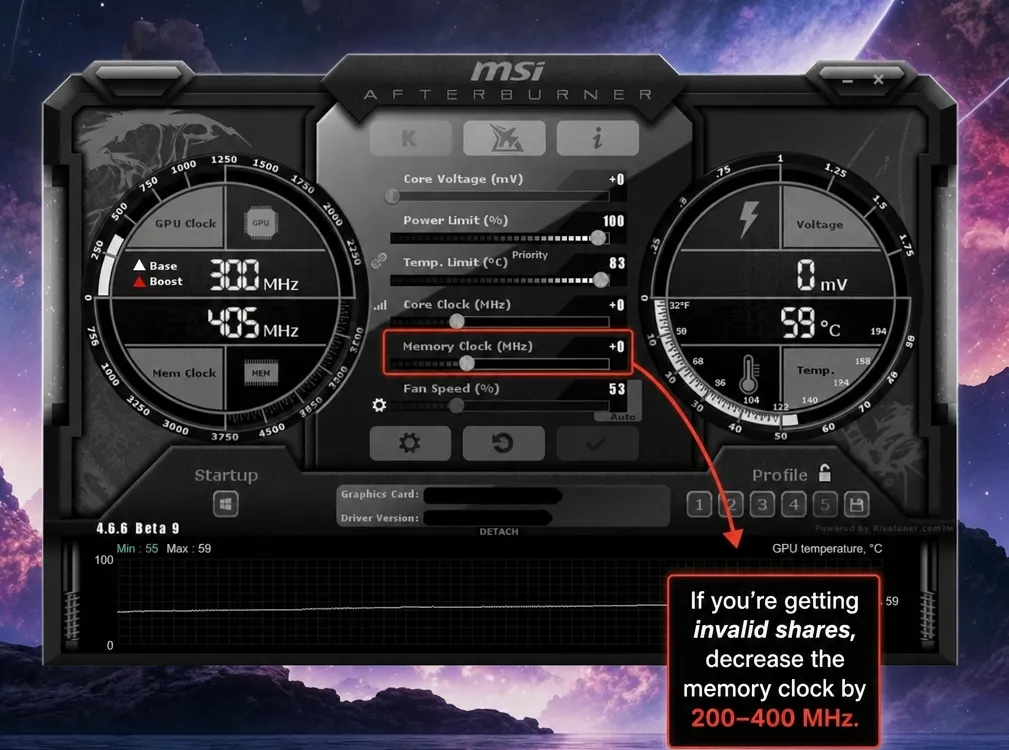
- Lower the memory clock by 200–400 MHz from where it is now.
- Let it run 30–60 minutes and check the reject percentage.
- If it improved, keep lowering in small steps until rejects fall to normal.
- Once you find a stable value, back off a little more — a reliability margin matters more than an extra percent of hashrate.
⚠️ The main overclocking rule for mining: a stable 100% beats 103% with rejects. Final earnings are counted by accepted shares, not by a pretty hashrate number on the screen.
🔗 More on safe overclocking — MSI Afterburner: GPU overclocking for mining.
6. Cause 2: a poorly chosen pool
The main culprit behind stale shares. The farther away the pool server is physically, the longer your solution takes to travel — and the higher the chance of arriving late.
How to fix it:
- Check which server region you specified in
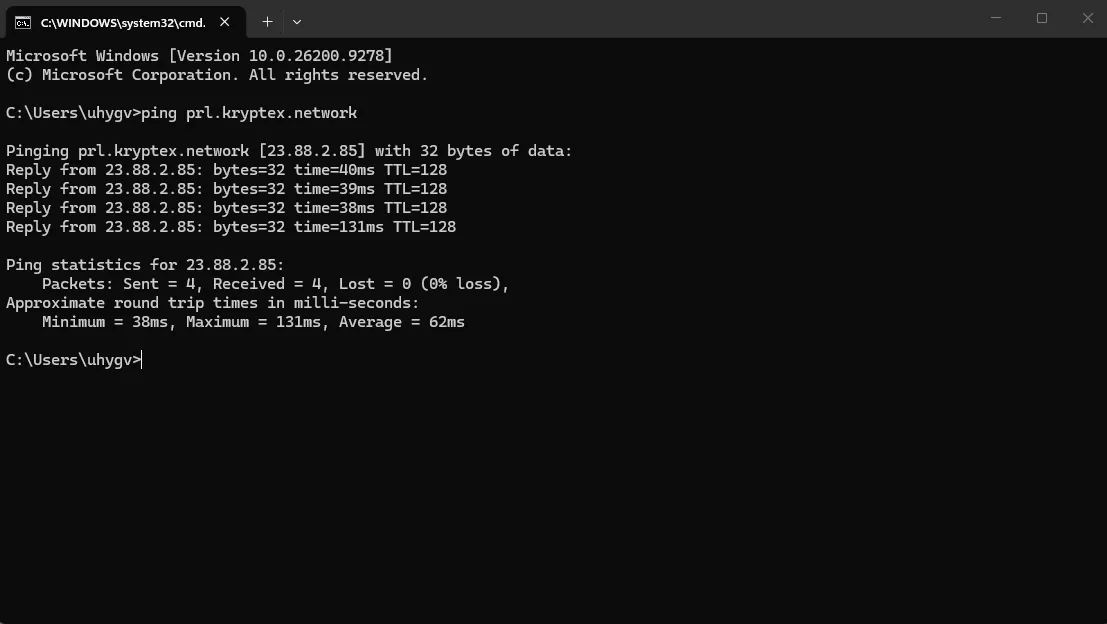
--server. Many pools have servers for different regions (EU, US, ASIA) — pick the one closest to you. - Measure the latency to the server. Open Command Prompt (Win+R →
cmd) and run:ping pool-address
Benchmark: under 50 ms — excellent, under 100 ms — acceptable, above 150 ms — look for another server. - Try an alternative pool for a day and compare the reject percentage.
7. Cause 3: internet problems
Even with a good pool, an unstable connection produces stale shares.
What to check:
- Wi-Fi → switch to a cable. This is the most common finding. Wi-Fi introduces micro-dropouts and fluctuating latency; it's poorly suited to mining.
- Channel congestion. If someone is downloading torrents or watching streams at the same time, latency rises.
- ISP stability. Run a long ping with the
-tflag (ping pool-address -t) and leave it for 10 minutes. If you see packet loss or latency spikes, the problem is the connection. - Router. Cheap routers start dropping packets after long uptime. A reboot sometimes fixes it.
8. Cause 4: outdated miner version
Miners update often, and old versions start conflicting with new pool protocols. This can produce both invalid and duplicate shares.
How to fix it: download the latest version from the developer's official GitHub. Only from the official source — third-party builds often contain a hidden dev fee or malware.
🔗 Where to download safely and how to set it up — Gminer: download, setup and commands.
9. Cause 5: hardware (risers, power, card degradation)
If the overclock is already reset to stock and invalid shares remain, the problem is physical.
Risers. The most common one. A bad contact or a cheap riser corrupts the data. Check: does it sit firmly in the slot, is it loose, are there any scorched contacts? Test: connect the card directly to the motherboard without a riser. If the rejects disappear, the riser is to blame.
Power supply. If there isn't enough power or the delivery is unstable (sags, ripple), the card computes with errors. This is especially relevant for rigs with several cards. Add up the total draw — the PSU should have at least 20% headroom.
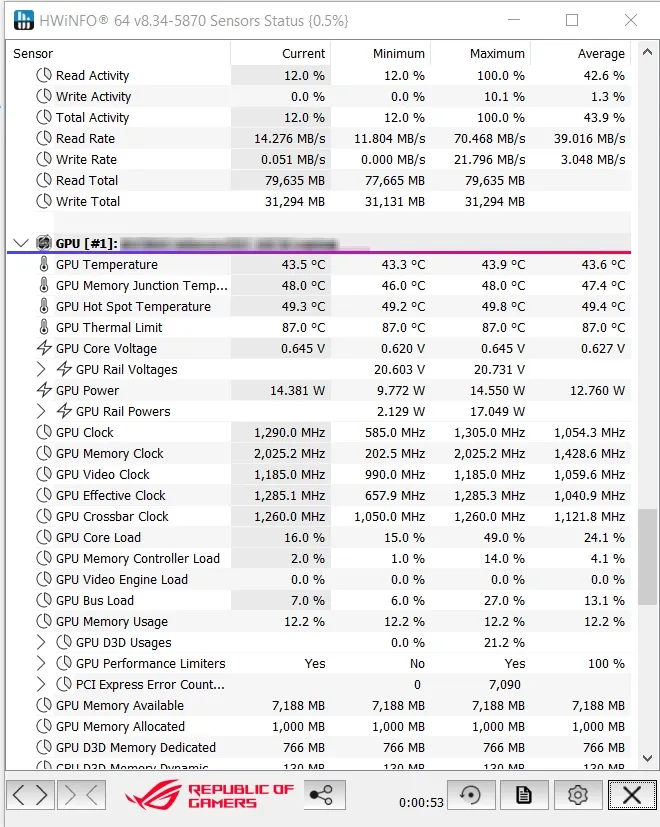
Card degradation. Used cards after long mining can have damaged memory. How to check: run a video memory test with a specialized utility (for example, HWiNFO for monitoring memory errors). If the memory error counter is climbing, the card needs repair or thermal pad replacement.
Memory overheating. Even if the core is cool, the memory can overheat. At high memory temperatures errors rise. Watch the memory temperature separately from the core.
10. Cause 6: system clock out of sync
A rare but insidious cause — if the computer's clock has drifted, the pool may reject solutions as invalid.
How to fix it (Windows): Settings → Time & language → Date & time → turn on automatic synchronization and click "Sync now."
11. Diagnostic order: what to check step by step
Don't grab at everything at once. Go in order — from simple to complex:
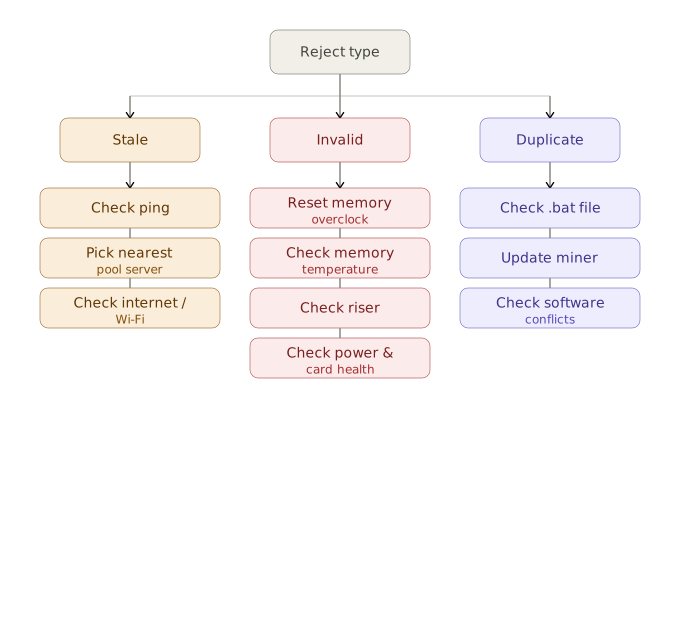
- Identify the reject type in the miner log (stale / invalid / duplicate). This immediately halves the search.
- Update the miner to the latest version — free and quick.
- Sync the clock — 30 seconds.
- If stale: check the ping to the pool, switch to the nearest region, move from Wi-Fi to a cable.
- If invalid: reset the memory overclock to stock values. If the rejects disappear, the overclock was to blame — raise it back carefully.
- If invalid remains after resetting the overclock: check the risers, then the power, then the card's memory.
- Compare with another pool for a day — to rule out a problem on the pool's side.
12. When rejects aren't your fault
Sometimes the problem is on the pool's side: maintenance, server overload, a DDoS attack. Signs: rejects rose suddenly while you changed nothing, and other miners are complaining on the pool's forum or Telegram channel.
What to do: wait a few hours, check the pool's status. If the problem persists, temporarily switch to a backup pool. It's useful to write a backup server into your .bat file in advance, so the miner switches automatically when the main one is unavailable.
13. Conclusion
Rejects are inevitable but manageable. Keep them within 1–2% and the losses will be negligible.
The essentials to remember:
- Identify the type of reject before fixing it — stale and invalid are fixed differently.
- Stale is connection and pool. Invalid is overclock and hardware.
- The most common cause is over-tightened memory. Start by resetting the overclock.
- Stability beats maximum hashrate: earnings are counted by accepted shares.
⚠️ This material is for informational purposes. Overclocking and hardware modification are done at your own risk and may affect your warranty.