How to choose a mining pool: workers, fees and payout schemes
Mining pools and workers in plain terms: PPS vs PPLNS, what to check when choosing, how to set the pool in your miner. For GPU mining, no extra theory.
What a mining pool and a worker are in plain terms, how PPS differs from PPLNS, what to look at when choosing, and how to write the pool into the miner settings correctly. For GPU mining, without extra theory.
Updated: 2026-10-03 · Reading time: ~9 minutes
#pools #gpu-mining #basics
Contents
- What a pool is in plain terms
- Why mining solo is pointless
- What a worker is
- Payout schemes: PPS, PPLNS and others
- What is more profitable for a home miner
- Criteria for choosing a pool
- Why geographic location is critical
- Fees: what to look at
- Minimum payout — an important detail
- How to write the pool into the miner
- Backup pool: insurance against downtime
- How to check that everything works
- Conclusion
1. What a pool is in plain terms
A mining pool is a server that combines the power of many miners, distributes tasks between them, and then splits the reward for found blocks proportionally to each one's contribution.
Analogy: instead of buying lottery tickets alone for years hoping to win, you chip in with a thousand people and split the winnings among everyone. Each one's win is smaller but regular and predictable.
2. Why mining solo is pointless
Theoretically you can mine solo — directly to the network, without a pool. But in practice, for a home video card this is a lottery with near-zero odds: the network difficulty is such that a single card can search for a block for years and never find one.
A pool gives stable small payouts instead of a theoretical big win that will most likely never happen. That's why 99% of GPU miners work through a pool.
3. What a worker is
A worker is the identifier of your specific device on the pool. Simply put, the name under which the pool sees your video card or rig.
Why it's needed: if you have several rigs, workers let you see statistics for each one separately. One broke down or the hashrate dropped — you immediately see which one.
In the miner settings the worker is usually specified after the wallet address, separated by a dot:
--user YOUR_WALLET_ADDRESS.rig1
Here rig1 is the worker name. You can name it anything (Latin letters, no spaces): rig1, home, rtx3070.
4. Payout schemes: PPS, PPLNS and others
This affects your real income, so figure it out before connecting.
PPS (Pay Per Share) — the pool pays a fixed amount for each accepted share, regardless of whether the pool found a block. The pool takes all the risk. For this it charges a higher fee.
- Plus: predictable income every day.
- Minus: the fee is higher.
PPLNS (Pay Per Last N Shares) — the pool pays only from actually found blocks, distributing the reward among those who sent shares within a certain window.
- Plus: the fee is lower; with stable long-term work the income is usually higher.
- Minus: income is uneven — there are "empty" days and lucky ones. Not profitable if you frequently jump between pools.
FPPS (Full Pay Per Share) — like PPS, but transaction fees from the block are additionally shared. Income is slightly higher than PPS.
PPS+ — a hybrid: the block reward under the PPS scheme, transaction fees under PPLNS.
SOLO — solo mining through the pool's infrastructure. All or nothing: find a block — take almost everything; don't find one — get nothing. Home mini-ASICs on solo pools work exactly this way — see Bitaxe and NerdMiner: flashing AxeOS, solo pool and overclocking.
💡 The difference in payout scheme can give a noticeable difference in profitability over the long run — this is not a trifle but one of the main selection parameters.
5. What is more profitable for a home miner
A practical answer without theory:
- If you mine stably and for a long time without switching — take PPLNS. Lower fee, more profitable over the distance.
- If you mine irregularly (turn it on at night, frequently change coins) — take PPS or FPPS. PPLNS loses its meaning in that mode: you don't fall into the distribution window.
- If you want predictability and don't like income spikes — PPS.
- SOLO is not for a beginner. With one card it's almost guaranteed zero.
6. Criteria for choosing a pool
Look at these parameters in order of importance:
- Geographic location of the servers — critical, see the next section.
- Total pool hashrate — a too-small pool rarely finds blocks; a too-gigantic one is bad for network decentralization. Medium and large are optimal.
- Fee — usually 0.5–2%.
- Payout scheme — see above.
- Minimum payout amount — see below.
- Reputation and time in operation — a pool that has been running for years is more reliable than yesterday's.
- Transparency of statistics — a good pool honestly shows stale shares and doesn't hide them for the sake of a pretty "0% rejects" number. Zero rejects don't exist in principle.
- Support for your coin and algorithm.
- A decent interface and per-worker statistics.
7. Why geographic location is critical
This is the most underestimated parameter, and it directly affects your income.
The farther away the pool server is physically, the longer your solution travels — and the more often it arrives late, turning into a stale share you won't be paid for.
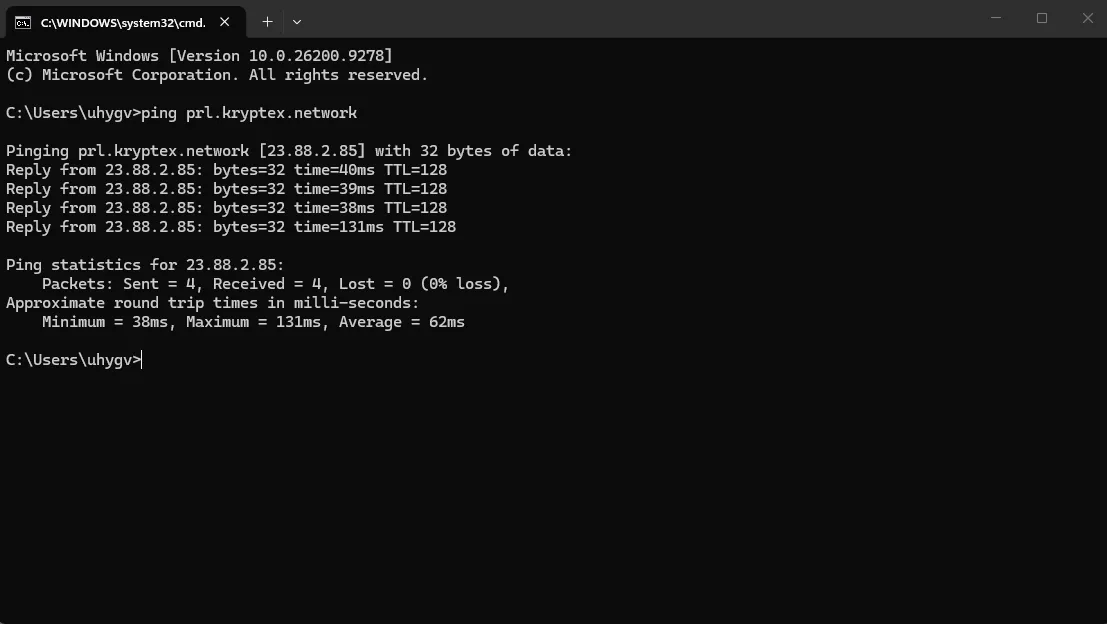
How to check before connecting. Open the command prompt (Win+R → cmd) and run:
ping pool-address
Latency benchmarks:
- under 50 ms — excellent;
- 50–100 ms — acceptable;
- 100–150 ms — tolerable but not ideal;
- above 150 ms — look for a closer server.
Most pools have servers in different regions (EU, US, ASIA) — pick the closest one.
🔗 If there are many rejects — the breakdown of all causes is here: Rejected shares: why shares get rejected and how to fix it.
8. Fees: what to look at
The pool fee is usually 0.5–2% of your income. But don't only count it:
- Withdrawal fee. Some pools charge a separate fee per transaction, and with small payouts it can eat a noticeable part.
- Hidden conditions. Read the FAQ section on the pool's site before connecting.
- Fee-to-scheme ratio. PPS with a 2% fee can turn out more profitable than PPLNS with 1% if you mine irregularly. And vice versa.
⚠️ Don't choose a pool only by the lowest fee. A pool with a 0.5% fee but distant servers and high stale shares will bring less than a 1% pool next to you.
9. Minimum payout — an important detail
The pool doesn't send earnings immediately — it accumulates up to the minimum payout amount, after which it goes to your wallet.
Why it matters for a beginner: if you have one video card and the minimum payout is high, you may wait for a withdrawal for weeks. Check this parameter in advance and choose a pool with a threshold that is realistically achievable on your hardware within a reasonable time.
Many pools allow setting the threshold manually in the account — reduce it if you want to receive payouts more often (considering the withdrawal fee).
10. How to write the pool into the miner
Everything you need is taken from the pool's site, in the connection section. Usually ready-made lines are given right there.
Standard command structure:
miner.exe --algo ALGORITHM --server POOL_ADDRESS:PORT --user WALLET.WORKER --pass x
What's important not to confuse:
- The port often depends on the algorithm and the difficulty level — take exactly the one specified on the pool's site for your coin.
- The wallet address — of the very coin you're mining. An address from another coin won't work.
- The worker — in Latin letters, no spaces, after the wallet separated by a dot.
🔗 Full instructions on building a .bat file — Gminer: download, setup and commands.
11. Backup pool: insurance against downtime
Pools sometimes go down — maintenance, overload, an attack. If the miner is configured for one pool, when it's unavailable you simply idle and lose money.
Solution: write in a backup server the miner will switch to automatically. Most miners support several addresses in the command — check the syntax in your miner's documentation.
It's useful to set as backup another region of the same pool or an entirely different pool.
12. How to check that everything works
After launching:
- In the miner console there should be accepted shares going — it means the pool accepts your work.
- In the pool account your worker with a hashrate will appear in 10–30 minutes. If there's no worker — check the correctness of the wallet address in the command.
- Compare the hashrate in the miner and on the pool — on the pool it's averaged and may differ slightly, this is normal.
- Watch the reject percentage for the first 24 hours.
If the miner doesn't connect at all — the breakdown of causes is here:
🔗 Miner won't start or crashes immediately: 8 causes and fixes.
13. Conclusion
Choosing a pool is not a formality but a decision that affects income:
- Server location matters more than the fee — a distant pool will eat the difference with stale shares.
- PPLNS for stable long mining, PPS/FPPS for irregular.
- Check the minimum payout — otherwise you'll wait for a withdrawal for weeks.
- Ping the server before connecting, it's 30 seconds.
- Write in a backup pool — downtime costs money.
⚠️ This material is for informational purposes and is not a financial recommendation. Mining profitability depends on the exchange rate, network difficulty and electricity cost.