Hive OS: install, set up and run a miner — the complete guide
Hive OS from scratch: which image to download, flashing an SSD, rig.conf and FARM_HASH, flight sheets, a custom miner, NVIDIA overclocking and common fixes.
Hive OS is a Linux-based system for mining rigs: you write it to an SSD or a USB stick, boot the rig, and manage it from a browser or a phone. This guide covers which image to download, how to flash it and connect the rig to the dashboard with FARM_HASH, how to build a flight sheet for a built-in miner and for your own miner using SRBMiner-Multi as the example, how to set up overclocking, and what to do when the rig does not show up in the dashboard.
📌 Status as of October 6, 2026: on the Hive OS download server the first stable image listed is
hiveos-0.6-229-stable-jammy@241231(Ubuntu 22.04, NVIDIA driver 550.142). Newer imageshiveos-0.6-230-jammy@260708andhiveos-0.6-230-beta-noble@260708, dated July 8, 2026, sit next to it but are not yet in theVERSIONS.txtlist. Hiveon Pool was shut down on May 15, 2026: if an old flight sheet still points to it, switch the pool.
Dashboard items are named as they appear in the English interface: Flight Sheets, Wallets, Overclocking Profiles.
What Hive OS is and what it costs
Hive OS has two parts. The system itself runs on the rig: NVIDIA and AMD drivers, miners, and an agent that sends statistics. In the browser there is the the.hiveos.farm dashboard, where you see hashrate, temperatures and logs, change the miner, pool and overclocking, and reboot the rig. NVIDIA and AMD cards can work in the same rig.
Prices as of October 6, 2026, from the Hiveon pricing page:
| Plan | Price | What is included |
|---|---|---|
| Start | $0 | up to 2 workers, 3 days of statistics, limited features |
| Personal, GPU rig | $0.50 per month per card, capped at $3 per rig with 6+ cards | all features, 180 days of statistics, multiple farms |
| Personal, CPU-only rig | $0.50 per month | the same |
| Personal, ASIC | $2 per month | the same |
Payment is accepted in cryptocurrency only. A worker is one rig or one ASIC in the dashboard. The number of cards in a free rig is not limited.
What you need
- A rig with NVIDIA or AMD graphics cards. A monitor is only for when something goes wrong: plug it into the first card, in the PCIe x16 slot.
- A drive. A USB stick of 8 GB or more is fine for a trial; for permanent work Hive recommends an SSD, because USB sticks are slower and fail more often.
- Wired internet on the rig and a Windows, macOS or Linux computer to write the image.
- A wallet address for the coin you plan to mine and a chosen pool. How to choose a pool is in How to choose a mining pool: workers, fees and payout schemes.
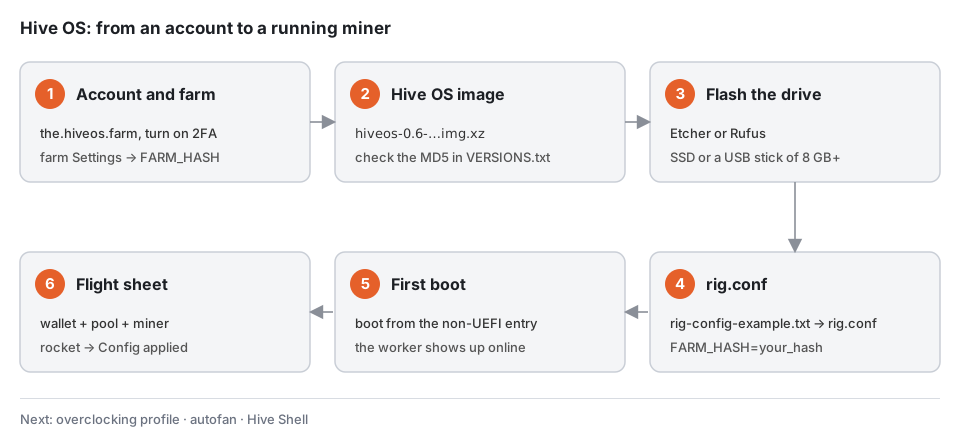
Step 1. Account, farm and FARM_HASH
- Sign up at the.hiveos.farm and turn on two-factor authentication: your username in the top right → Account → Two-factor Authentication.
- Create a farm: the plus icon → Create New Farm, enter a name and the time zone where the rigs are located. Log timestamps use that time zone.
- Open the farm's Settings and copy the FARM_HASH. It is a long string of letters and digits; the rig uses it to add itself to this farm.
🔒 FARM_HASH is the key to your farm. Anyone who has it can attach their own rig to the farm. Do not post it on forums or in screenshots.
There is also a second way: create a worker by hand (Add Worker) and put its RIG_ID and password into the config. FARM_HASH is faster, especially with several rigs.
Step 2. Which image to download
The easiest path is the plus icon → Add Worker → GPU: the wizard in the dashboard offers an image and gives you a ready rig.conf. If you download by yourself, use the files from hiveon.com/install or from the download server download.hiveos.farm.
| Image | Date | Base | Linux kernel | NVIDIA driver |
|---|---|---|---|---|
hiveos-0.6-229-stable-jammy@241231 | 2024-12-31 | Ubuntu 22.04 | 6.6.60 | 550.142 |
hiveos-0.6-229-stable-focal@241230 | 2024-12-30 | Ubuntu 20.04 | 6.1.110 | 550.142 |
hiveos-0.6-230-jammy@260708 | 2026-07-08 | Ubuntu 22.04 | not listed in VERSIONS.txt | not listed in VERSIONS.txt |
Check the MD5 of the downloaded archive against download.hiveos.farm/VERSIONS.txt. For the 229 stable jammy image it lists cc685377bf05f077336fb58b10798790. In PowerShell:
Get-FileHash .\hiveos-0.6-229-stable-jammy@241231.img.xz -Algorithm MD5
Letter case does not matter. If the hash does not match, download the archive again.
⚠️ Important. The 550 driver in image 229 is older than the RTX 50xx cards. If your rig has them, update the driver after the first boot with
nvidia-driver-update(see the update section below).
Step 3. Write the image to an SSD or a USB stick
Hive recommends balenaEtcher, with Rufus as the alternative. Both exist for Windows, and you do not need to unpack the .img.xz first.
- Connect the SSD through a USB adapter or insert the USB stick.
- In Etcher click Flash from file and pick the downloaded archive.
- Select target is your drive. Check the letter and size: everything on it will be erased.
- Click Flash and wait for the write to be verified.
On Linux and macOS you can write the image with dd, but first find the right disk in fdisk -l: a mistake in of= will wipe the wrong disk.
dd if=hiveos-0.6-229-stable-jammy@241231.img of=/dev/sdX bs=10M status=progress
After writing, a new disk called HIVE appears in the system. If Windows offers to format it, decline.
Step 4. Create rig.conf
Open the HIVE disk, find rig-config-example.txt and edit it in Notepad:
HIVE_HOST_URL="https://api.hiveos.farm"
FARM_HASH=YOUR_FARM_HASH
RIG_PASSWD=
RIG_ID=
WORKER_NAME=rig-01
FARM_HASHis the string from the farm settings, with no quotes or spaces.- Leave
RIG_IDandRIG_PASSWDempty when you use FARM_HASH. WORKER_NAMEis the rig name in the dashboard. If you leave it empty, Hive generates one.
Save the file as rig.conf in the root of the HIVE disk. Make sure Notepad did not add .txt: in Explorer turn on View → File name extensions. You can also download a ready rig.conf from the worker settings in the dashboard.
Step 5. First boot of the rig
- Connect the drive to the rig and power it on.
- In the BIOS choose to boot from that drive. If the drive is listed twice, pick the entry without the UEFI prefix.
- If the USB stick is missing from the boot list, enable Legacy USB support, and on some boards CSM.
The first boot takes longer than usual: the system expands the partition, detects the cards and registers the rig. When it is done, the screen shows a connection message and a new worker appears online in the dashboard. The miner is not running yet: it needs a flight sheet.
You can get into the rig's console like this:
| Method | How to connect |
|---|---|
| SSH from the local network | ssh user@RIG_IP, the default password is 1 |
| In a browser from the local network | https://RIG_IP:4200/ (Shellinabox) |
| VNC | vnc://RIG_IP:5900 |
| From the dashboard, from anywhere | Hive Shell or the Run Command button on the worker page |
If you set your own password on the first run, use it instead. Run commands for miners and the agent as root: sudo -s first. It is better to change the default password at once with passwd.
Step 6. Wallet and flight sheet
A flight sheet is a set of "coin + wallet + pool + miner". A rig gets one sheet, and you can switch the coin in a couple of clicks later. The example below is Ethereum Classic with lolMiner on the 2Miners pool.
Add a wallet
Wallets → Add Wallet:
- Coin —
ETC; - Address — your address. For ETC, 2Miners accepts payouts in ETC, BTC or TON — check the terms on the pool's help page;
- Name — any clear name, for example
ETC Trust Wallet.
Build the flight sheet
Flight Sheets → Add New Flight Sheet:
- Coin —
ETC. It works as a filter: from here the lists keep only wallets, pools and miners for ETC. - Wallet — the wallet from the previous step.
- Pool — 2Miners, then the servers in order:
etc.2miners.com:1010,us-etc.2miners.com:1010,asia-etc.2miners.com:1010. The order you pick is the failover order: if the first server is unreachable, the miner moves to the second. If your pool is not in the list, choose Configure in miner and type the address into the miner settings. - Miner —
lolMiner. You can leave Setup Miner Config alone at first: the miner starts with its default settings. - Name — for example
ETC · 2Miners · lolMiner, then Create Flight Sheet.
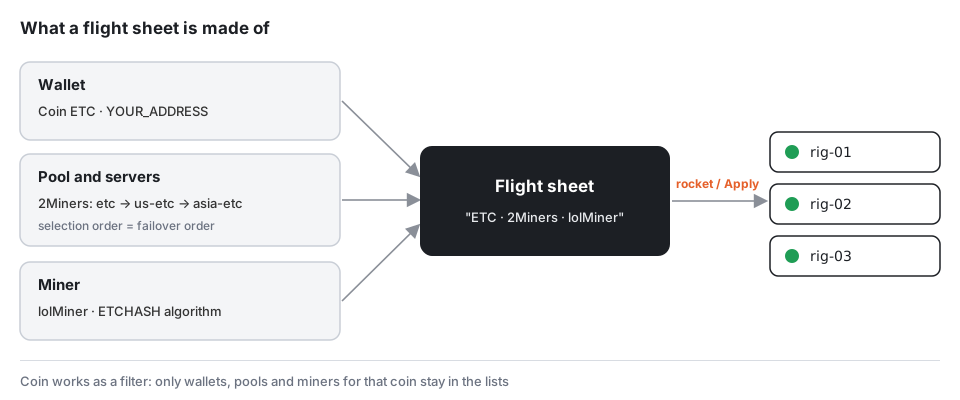
Start the miner
On the worker page open the Flight Sheet tab and click the rocket to the right of the sheet you want. For several rigs, tick them in the Workers list and click the rocket in the top bar. A few seconds later the farm log shows Config applied, followed by the hashrate of each card.
How to run a miner that is not in the list
Miners update more often than Hive OS's built-in list, so fresh versions are installed as a Custom miner. The developers of SRBMiner-Multi, BzMiner and WildRig Multi publish separate archives for this on their release pages:
| Miner | Hive OS archive (as of October 6, 2026) |
|---|---|
| SRBMiner-Multi 3.7.2 | srbminer_custom-3.7.2.tar.gz |
| BzMiner v100.45 | bzminer_custom-v100.45.tar.gz |
| WildRig Multi 0.51.3 | wildrig-multi-hiveos-0.51.3.tar.gz |
Example — SRBMiner-Multi on Pearl (PRL) through 2Miners:
- In the flight sheet, pick a Coin and Wallet from those available in the dashboard: the miner takes the real address and pool from the arguments below. Set Pool to Configure in miner and Miner to Custom.
- Click Setup Miner Config and fill in the fields as in the diagram below.
- Installation URL is the link to
srbminer_custom-3.7.2.tar.gzfrom the release page. Take the address from there and check the number of the latest version. - The SRBMiner developer asks you to set everything by hand in Extra config arguments: algorithm, pool and wallet. He advises against using placeholders such as
%WAL%in those fields.
--algorithm pearlhash --pool prl.2miners.com:1818 --wallet YOUR_ADDRESS.RIG_ID --password x --disable-cpu
- Apply Changes → Create Flight Sheet → rocket.
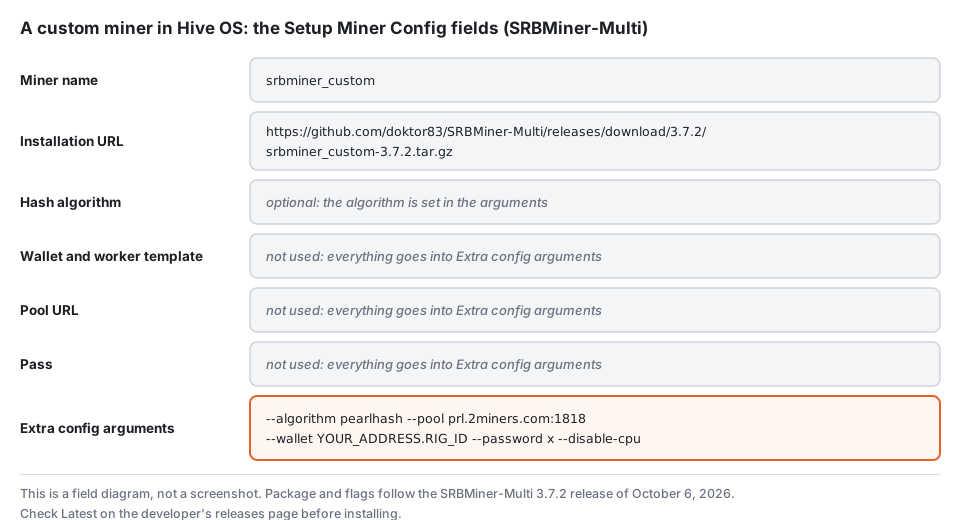
To update a custom miner, just replace the Installation URL in the flight sheet with the archive of the new version. SRBMiner's parameters are covered in SRBMiner-Multi: How to Download, Set Up, and Run It, and the Pearl coin in How to Mine Pearl (PRL) on a GPU.
💡 SRBMiner 3.7.2 of October 6, 2026 added an experimental Pearl mode for NVIDIA Ampere, Ada and Blackwell, enabled with the
--pearl-k1parameter. Its overclocking differs from the regular code: the developer suggests a 810 MHz memory clock and re-tuning the power limit and core offset.
Which miners are alive and which are abandoned is in Mining software: which miners are maintained, which are abandoned, and what to install.
A second miner on the CPU
The rig's processor sits idle while the graphics cards mine. You can put it to work with XMRig on Monero as a second miner in the same flight sheet:
- Open the flight sheet → three dots → Edit → Add Miner.
- Coin —
XMR, Wallet — your Monero address, Pool — a pool from the list or Configure in miner. - Miner —
XMRig. In Setup Miner Config enter the pool address if you chose manual setup. - Save the sheet and apply it again.
Choose the thread count for your processor. If the graphics cards start losing hashrate or shares, give the CPU miner fewer threads: the GPU miner needs some CPU as well.
Overclocking: a profile for NVIDIA and AMD
Overclocking in Hive OS is set up in Overclocking Profiles → Add OC Profile. A profile can apply to the whole farm or to a single worker, and worker settings take priority over farm settings. In the Algo field you can set separate values for a specific algorithm or keep Default Config for all.
NVIDIA
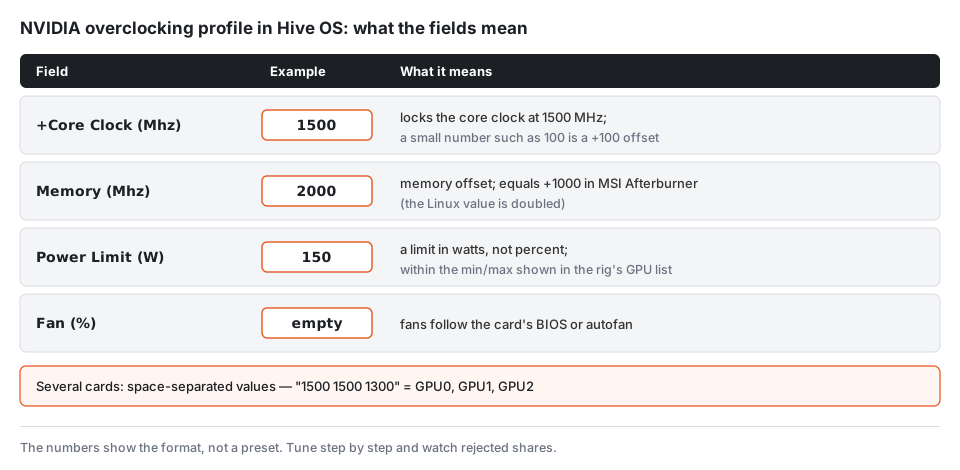
- +Core Clock (Mhz) is the core clock offset. If you enter an absolute value such as
1500, Hive OS locks the core clock at that level. Clock locking appeared in image 0.6-202 and is usually more efficient than an offset. - Memory (Mhz) is the memory offset. On Linux it is twice the MSI Afterburner value: +800 in Windows corresponds to 1600 in Hive OS.
- Power Limit (W) is a limit in watts, not percent. The minimum, default and maximum for each card are shown in the rig's GPU list. A value outside those limits will not be applied.
- Fan (%) — leave it empty if you turn on autofan.
For several cards, write space-separated values: 1500 1500 1300 means GPU0, GPU1, GPU2. You can see the current clocks with nvidia-smi through Run Command. How to tune values step by step is in MSI Afterburner: step-by-step GPU overclocking for mining: the principle is the same, with the memory ×2 correction.
AMD
For AMD, clocks and voltages are absolute values: Core Clock, Core Voltage (mV), Memory Clock, plus the Core State and Mem State indexes for undervolting. The amd-info command shows the current parameters. If you do not know where to start, open the popular presets tab for your model and begin with those.
⚠️ Important. Any value above stock can make the rig unstable. Change one parameter at a time and let the rig run. Rising rejected shares are the first sign that the memory overclock is too aggressive: see Rejected shares: why shares get rejected and how to fix it.
Autofan and watchdog
Autofan lets you set a target temperature and minimum fan speed, so the fans spin only as much as needed. Hive explains the benefit this way: the fan curve in a card's BIOS is built for use without overclocking, where temperatures up to 70–75 °C are considered normal, while in overclocked mining such heat can cause failures and faster wear.
A hardware watchdog reboots the rig when the whole system has hung and software tools no longer help. Hive OS supports several types: SimpleRigResetter SRRv2 (it needs the file /hive-config/watchdog_srrv2.txt), inexpensive Chinese models with USB ID 1a86:7523, 5131:2007 or 0471:2379, and the OpenDev watchdog, which needs no setup. You can check that the system detected it with journalctl -u hive -b0.
Access to the rig from anywhere
The Hive OS dashboard works over the internet, so you can watch statistics and change the flight sheet from a phone. For a console without port forwarding there is Hive Shell, and for ASICs and web interfaces on the same network — a VPN. The details are in Remote access to your rig and ASICs: Tailscale, ZeroTier and Hive Shell without port forwarding.
🔒 Do not expose SSH (port 22), VNC (5900) or Shellinabox (4200) to the internet through your router. The default password is public knowledge, and scanners find open ports quickly.
Updating Hive OS and drivers
selfupgradeupdates Hive OS. The update button in the dashboard does the same.nvidia-driver-updateinstalls the latest stable NVIDIA driver from the Hive repository.nvidia-driver-update --listshows versions compatible with the current kernel. The update takes 5–10 minutes on an SSD and 20–30 minutes on a slow USB stick; reboot the rig afterwards.hive-replacerewrites the system image remotely, without pulling the drive.rig.confis preserved.
Hive OS advises against updating the driver without a reason: if the rig is stable, leave it alone. Good reasons are new cards the old driver cannot see, or a clear gain in the miner.
Command cheat sheet
| Command | What it does |
|---|---|
miner | open the miner window; leave without stopping it with Ctrl+A, then D |
miner log | the miner log |
miner start / miner stop | start or stop the miner |
agent-screen | the Hive OS agent window |
hello | contact the server again: refreshes IP and config |
firstrun -f | enter the rig ID and password again |
nvidia-smi / amd-info | card clocks, temperatures and power draw |
gpu-fans-find | spin the card fans in turn to find the right one |
logs-off | keep logs in RAM and spare the USB stick |
disk-expand | use all free space on the disk |
sreboot | hard reboot |
Common problems
The rig does not boot from the drive. In the BIOS pick the boot entry without UEFI, and turn on Legacy USB or CSM. If booting starts but fails with a file-system error, write the image again with another tool: Rufus instead of Etcher or the other way round.
The rig booted but is not in the dashboard. Check that the file is named exactly rig.conf, not rig.conf.txt, and that FARM_HASH was copied in full. Check the cable and the internet on the rig. Then run hello; if that does not help, run firstrun -f and enter the data again.
The miner does not start or restarts at once. Look at miner log. Common causes are a typo in the wallet or pool address, a wrong algorithm and an overclock that is too aggressive. A general checklist is in Miner won't start or crashes immediately: 8 causes and fixes.
Fewer cards than installed. Check the risers and power: Hive points to the missing card, and gpu-fans-find helps find it physically. For new models update the driver with nvidia-driver-update.
Not enough disk space. Run disk-expand. Old NVIDIA driver archives are stored in /hive-drivers-pack/ and can be deleted.
Frequently asked questions (FAQ)
Is Hive OS free? Yes, for two workers — with no limit on cards, pools or coins, but statistics are kept for 3 days and some features are unavailable. From the third worker you need the Personal plan: from $0.50 per month per card, but no more than $3 per rig.
Which is better: an SSD or a USB stick? A USB stick of 8 GB or more is enough to test. For a rig that runs around the clock, Hive recommends an SSD: it is faster and more reliable. If you stay on a stick, run logs-off so logs are written to RAM.
Do I need a monitor? Only when booting fails. Plug it into the first card, in the PCIe x16 slot. The rest of the time the rig is managed through the dashboard.
Can I mine a coin that is not in the list on Hive OS? Yes. Pick Custom in the miner field and point it to the miner's release archive, as in the SRBMiner example above. The pool and wallet are then set in the miner's arguments.
Why is the memory value in Hive OS twice the Afterburner one? On Linux the memory offset uses a different unit. Hive gives an example: +800 in MSI Afterburner equals 1600 in Hive OS.
Does Hiveon Pool still work? No. Hiveon shut the pool down on May 15, 2026. Hive OS itself keeps working, and you can mine on any other pool: change the pool in the flight sheet.
Where do I get the FARM_HASH? In the farm settings in the dashboard, on the Settings tab. Every farm has its own hash.
Sources
Data checked on October 6, 2026. The guide follows the official Hiveon documentation and miner releases; we did not repeat every step on a separate rig. The diagrams were drawn by us and are not screenshots. Cryptolexicon is an independent reference and is not affiliated with Hiveon. The links point to documentation and release pages, not to archives.
- Hiveon — Hive OS install page: writing the image, rig.conf, default login, SSH, VNC and Shellinabox.
- Hiveon — the VERSIONS.txt image list: versions, kernels, drivers and MD5 sums.
- Hiveon — pricing: 2 free workers, Personal prices.
- Hiveon — Farm Hash and quick installation: rig.conf and a drive of 8 GB or more.
- Hiveon — updating NVIDIA drivers:
nvidia-driver-updateand its options. - Hiveon — Hiveon Pool termination: the dates and switching pools.
- Hiveon — knowledge base on GitHub: flight sheets, custom miner, overclocking, autofan, commands and boot problems.
- SRBMiner-Multi — release 3.7.2: the Hive OS archive, parameters,
--pearl-k1. - lolMiner — NVIDIA clock locking: an absolute value in +Core Clock on Hive OS.
- 2Miners — help pages for ETC and PRL: server addresses and launch lines.
This material is for informational purposes only and is not financial advice. Image, driver, miner versions and prices are as of October 6, 2026 — check the official pages for current data before installing.