MoreClockTool (MCT): tuning RX 6000/7000/9000 for mining without flashing
MoreClockTool (igor'sLAB) instead of MorePowerTool on RDNA 3/4: what the fields do, tuning clock and voltage step by step, a rig startup profile via MCT Slim.
MoreClockTool (MCT) is a free utility from the igor'sLAB team that sets clock, voltage, power limit, memory timing level and fan speed on AMD cards directly through the driver libraries, bypassing the Adrenalin panel. For a miner it is the main fine-tuning tool for RX 6000, 7000 and 9000: flashing a modified BIOS on these cards is impossible, and MorePowerTool has been shut out of RDNA 3 by AMD itself. This guide covers what MCT can and cannot do, what each field means, how to find values for KawPow and Autolykos without bricking anything, and how to apply a profile automatically when the rig starts.
If you run NVIDIA, this tool is not for you — see MSI Afterburner and overclocking. If you run Polaris or Vega, flashing still works there — see amdvbflash.
⚠️ Important. MCT lifts some driver restrictions. Thermal and current protections stay in place, but running outside spec for long periods shortens card life and is not covered by warranty. The authors say plainly that testing needs care and not every setting is meant for 24/7. From here on, at your own risk.
Why MCT when Adrenalin and Afterburner exist
Three reasons AMD miners leave the driver panel:
- The Adrenalin panel forgets settings. After a driver update, a crash or sometimes a plain reboot the tuning profile resets to stock. For a rig that has to come back up after a power cut without you, that is unacceptable.
- Afterburner is limited on AMD. On RDNA 3/4 it only sees clock offsets and the power limit; voltage and the memory timing level are out of reach.
- MorePowerTool is closed on RDNA 3. On RX 5000 and 6000 miners edited Soft PowerPlay tables in the registry with MPT. On RX 7000 AMD removed that path: flashing is controlled by the security processor and the driver no longer reads the tables. The MPT developer confirmed there will be no RDNA 3 support.
MCT fills that gap: it works through ADLX, AMD's official card-control API, sets everything the driver panel sets but in numbers rather than percentages, without a 400 MB interface, and it saves and loads profiles.
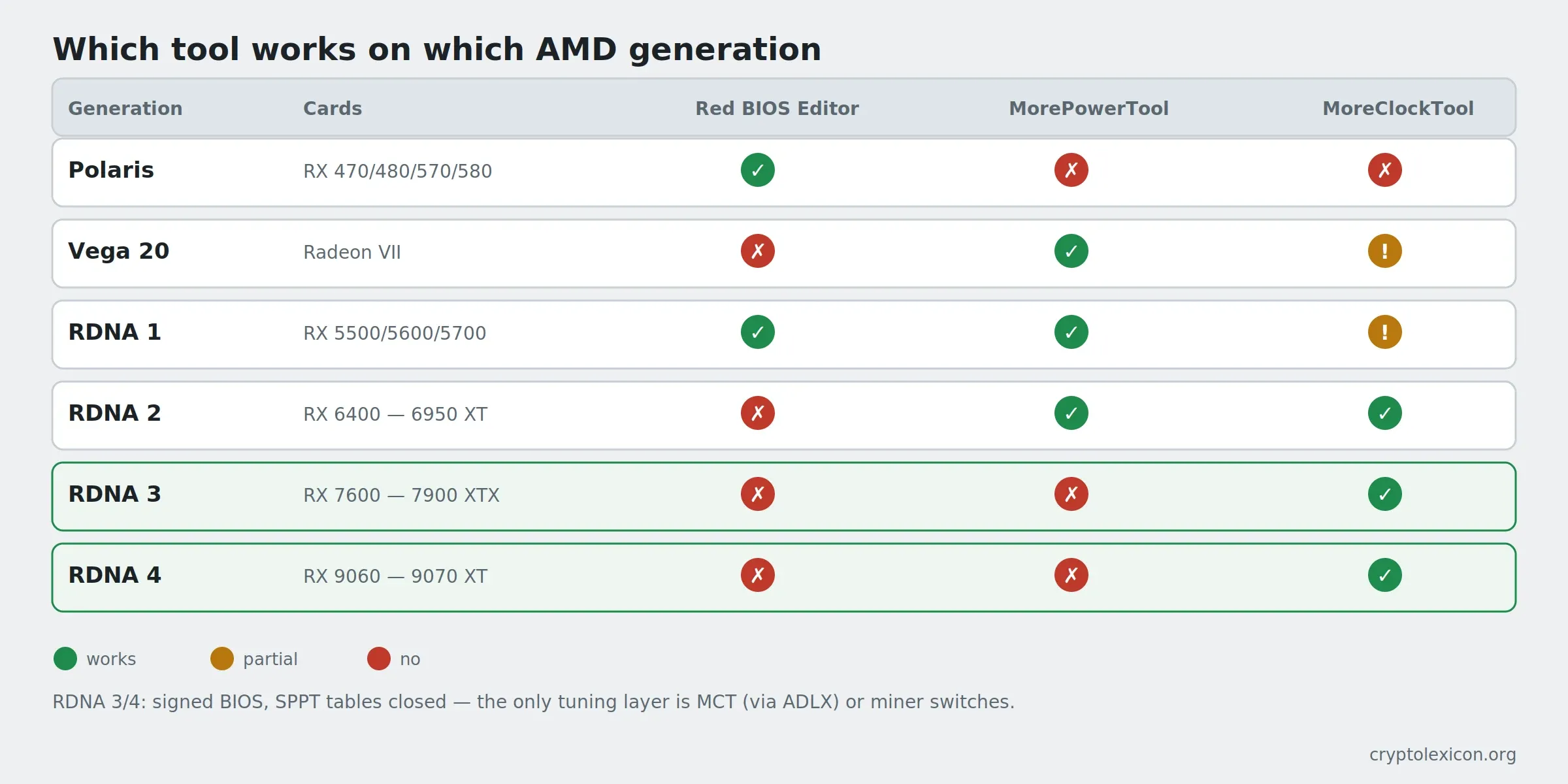
Compatibility by generation (per the igor'sLAB list, extended with RDNA 4):
| Generation | Cards | Red BIOS Editor | MorePowerTool | MoreClockTool |
|---|---|---|---|---|
| GCN 4 (Polaris) | RX 470/480/570/580 | Yes | No | No |
| GCN 5 (Vega 20) | Radeon VII | No | Yes | Partial |
| RDNA 1 (Navi 1x) | RX 5500/5600/5700 | Yes | Yes | Partial |
| RDNA 2 (Navi 2x) | RX 6400 — 6950 XT | No | Yes | Yes |
| RDNA 3 (Navi 3x) | RX 7600 — 7900 XTX | No | No | Yes |
| RDNA 4 (Navi 4x) | RX 9060 — 9070 XT | No | No | Yes (from 1.1.11 v2) |
What MCT does not do: it does not remove the hard clock and voltage limits baked into the BIOS; it does not edit memory timings line by line (only preset levels); it does not work without the Adrenalin driver installed. On RDNA 2 the upper limits can be widened beforehand with MPT; on RDNA 3/4 they cannot.
What you need before you start
- MoreClockTool from igor'sLAB — the Downloads section of the "Download area: MoreClockTool" article. Only from there: the authors pulled every beta precisely because copies were re-uploaded to third-party sites with bugs.
- MCT Slim — the command-line version driven by an ini file, on the same page. Needed for applying a profile at rig startup.
- A recent Adrenalin driver; MCT 1.1.11 v2 is built against ADLX 1.4, and drivers from early 2023 or older need the old MCT 1.0.1 build.
- HWiNFO or the miner log to watch voltage, hotspot temperature and memory errors.
- A miner that supports your cards: SRBMiner-Multi or TeamRedMiner.
📌 Status as of September 7, 2026: the current MCT is 1.1.11 Version 2 from April 12, 2025 (ADLX 1.4 support, RDNA 4 fixes). MCT Slim is 1.0.2. MorePowerTool is 1.3.19, RDNA 2 and older only. Check the download page before downloading.
🛡️ igor'sLAB installers trigger antivirus false positives — the authors warn about it right on the page. Add the folder to Defender exclusions in advance: how to do it.
MCT fields: what controls what
One window, few controls. The top row is the adapter selector (with several cards, each is tuned separately) and the buttons Set (apply now), Reset (back to factory), Load / Save (profiles; MCT also reads Wattman profiles).
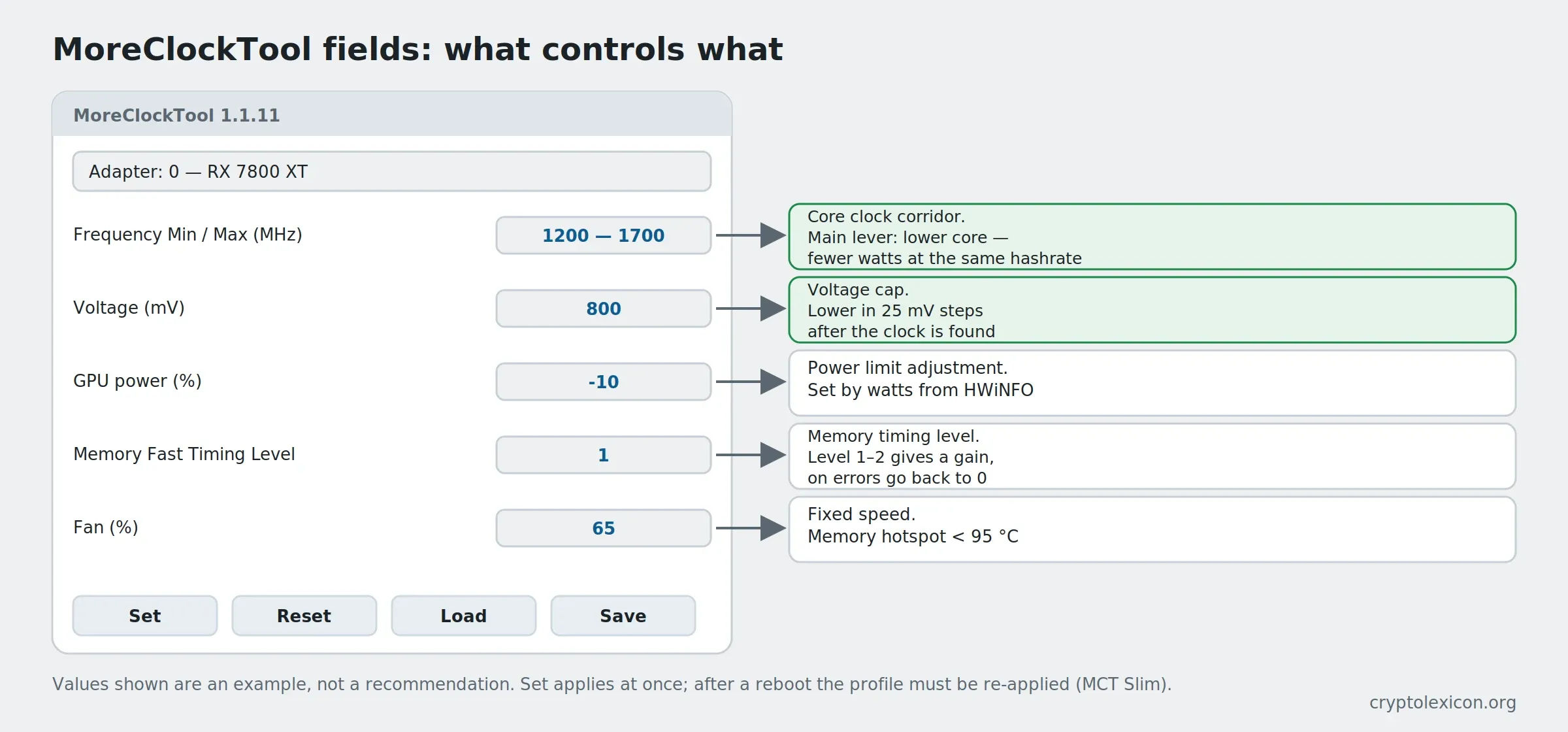
| Field | What it does | For mining |
|---|---|---|
| Frequency Min / Max (MHz) | Lower and upper core clock bounds, in numbers, no percentages | The main lever. On memory-bound algorithms (KawPow, Autolykos) the core goes down to 1300–1700 MHz — power drops faster than hashrate |
| Voltage (mV) | Upper cap on core voltage | The second lever. Comes down together with clock; below the stable threshold the miner hangs or errors out |
| GPU power (%) | Adjustment to the power limit (TGP) | Set it by the wattage in HWiNFO, not by feel. On RDNA 2 the ceiling can be widened with MPT |
| Memory Fast Timing Level | Memory timing level, same as Wattman | Level 1–2 gives a gain on memory-bound algorithms; on memory errors in the log, back to 0 |
| Fan | Curve or fixed speed | For a rig, fixed 60–75 % so the memory hotspot stays under 95 °C |
💡 What MCT sets holds until a reboot or the next driver intervention. For permanent operation you need profile autostart, see below.
Step 1. Record the baseline
Before any tuning, write down what the card does at stock: hashrate from the miner log, power and temperatures from HWiNFO. Without that line you cannot tell whether the result got better or just different.
Run the miner for 15 minutes at stock settings and record:
Card: RX 7800 XT   Algorithm: KawPow
Hashrate: __ MH/s   Power: __ W   Hotspot: __ °C   Errors: 0
Step 2. Lower the core clock step by step
In MCT set Frequency Max 200 MHz below stock, Set, let the miner run 10–15 minutes, record hashrate and watts. Repeat in 100 MHz steps until hashrate starts to drop noticeably. The point just before the drop is your working clock.
Typical starting ranges (not final values — every chip is different):
| Card | KawPow, core | Autolykos v2, core |
|---|---|---|
| RX 6600 / 6600 XT | 1300–1500 MHz | 1200–1400 MHz |
| RX 6700 XT / 6800 | 1400–1600 MHz | 1300–1500 MHz |
| RX 7600 / 7700 XT | 1500–1800 MHz | 1400–1700 MHz |
| RX 7800 XT / 7900 GRE | 1600–1900 MHz | 1500–1800 MHz |
| RX 9060 XT / 9070 | 1600–2000 MHz | 1500–1900 MHz |
💡 On RDNA 3 and 4 the shader core and the chip front end are clocked separately, and the driver moves the clock within Min–Max on its own. Do not set Min equal to Max: the card needs a corridor, otherwise it pins against the limit and loses stability.
Step 3. Lower the voltage
Once the clock is found, lower Voltage in 25 mV steps, 15 minutes under the miner per step. Stop signals:
- the miner restarts or "freezes" at zero hashrate;
rejected,invalid shareor memory errors grow in the log;- HWiNFO shows the real voltage no longer dropping — you have hit the BIOS floor.
Back off one step above the last stable value and add another 10 mV of margin. What rejected shares mean and how to tell a card problem from a pool problem is in rejected shares.
Step 4. Timings, memory and fans
- Set Memory Fast Timing Level to 1, test for 30 minutes. No errors — try 2. Errors appear — go back one level.
- Memory clock, if your MCT version shows it, goes up in 50 MHz steps; if the field is absent, set it through Adrenalin or miner switches.
- Fan — a fixed speed that keeps the memory hotspot under 95 °C. A curve is worse on a rig: it reacts with a delay.
Save the final profile with Save — for example rx7800-kawpow.ini — and run it for 24 hours without touching anything.
Step 5. Profile autostart with MCT Slim
The graphical MCT is for finding values. On a rig that has to come up on its own, MCT Slim does the job — the command-line version that takes the profile as an ini file. The archive contains sample ini files; copy the closest one and put in your values.
The rig start-up scheme in one .bat file: apply the profile, wait, then start the miner.
@echo off
cd /d C:\mct
MCTslim.exe rx7800-kawpow.ini
timeout /t 10
cd /d C:\miners\srbminer
SRBMiner-MULTI.exe --algorithm kawpow --pool YOUR_POOL:PORT --wallet YOUR_ADDRESS.RIG_ID
Check the exact MCTslim.exe call syntax against the samples in your version's archive — it may differ from what is shown. Put this .bat in startup or in Task Scheduler with a 60-second delay after logon so the driver is up before MCT.
💡 If settings do not apply after autostart, the order is almost always to blame: MCT started before the driver. Increase the scheduler delay or add
timeout /t 30before the call.
The alternative without MCT: miner switches
TeamRedMiner and SRBMiner-Multi can set some parameters themselves through switches in the .bat file. That is more convenient on a rig and needs no MCT, but it does not work on every generation and does not give the memory timing level. A TeamRedMiner example:
teamredminer.exe -a kawpow -o stratum+tcp://YOUR_POOL:PORT -u YOUR_ADDRESS.RIG_ID --clk_core_mhz=1600 --clk_core_mv=800 --clk_mem_mhz=2400
The switches apply at miner start, and per-card values can be given comma-separated. What exactly is supported on RDNA 3/4 in the current version — check the miner's README: the list changes from release to release. If the miner does not start at all after adding switches, the causes are in miner won't start: 8 causes.
Errors and fixes
MCT does not see the card / empty adapter list. The Adrenalin driver is missing or too old; MCT 1.1.11 v2 needs ADLX 1.4. Update the driver or take the old MCT 1.0.1 build for old drivers.
Set works but values do not change. You have hit BIOS limits. On RDNA 2 the ceilings can be widened with MPT; on RDNA 3/4 that is impossible, tune within what is available.
Everything is back to stock after a reboot. MCT does not "flash" settings — apply the profile with MCT Slim at startup, see step 5.
The driver dropped into Safe Mode. Power or voltage values too aggressive. Reset, return to the last stable profile, raise limits through MPT only on RDNA 2.
Several identical cards in the list, some "dead". Registry duplicates. igor'sLAB has a separate VGA Device Manager utility that cleans them.
Frequently asked questions (FAQ)
Does MCT work on an RX 7900 XTX / RX 9070 XT?
Yes. RDNA 3 has been supported for a long time, RDNA 4 since version 1.1.11 Version 2 from April 2025. A recent Adrenalin driver is required.
Can MCT remove the power limit the way MPT used to?
No. MCT works within the limits the BIOS sets. On RDNA 2 they can be widened with MPT; on RDNA 3/4 nothing can.
Does MCT replace BIOS flashing?
For RDNA — yes, it is the only tuning layer left. A modified BIOS on RX 5000 and newer will not boot: the image is signed.
Is it safe for the card?
Hardware thermal and current protections stay on. The risk is in long-term operation at non-standard values and reduced lifespan. The authors warn outright that not every setting is meant for 24/7.
What is better for a rig — MCT or miner switches?
Switches are simpler and need no extra program, but they do not cover everything and depend on the miner version. MCT gives the timing level and a stable profile independent of the miner. Many use both: MCT to find values, switches for the daily start.
Is there MCT for Linux / HiveOS?
No, MCT is Windows only. Linux mining OSes set overclocks from their own panels.
Conclusion
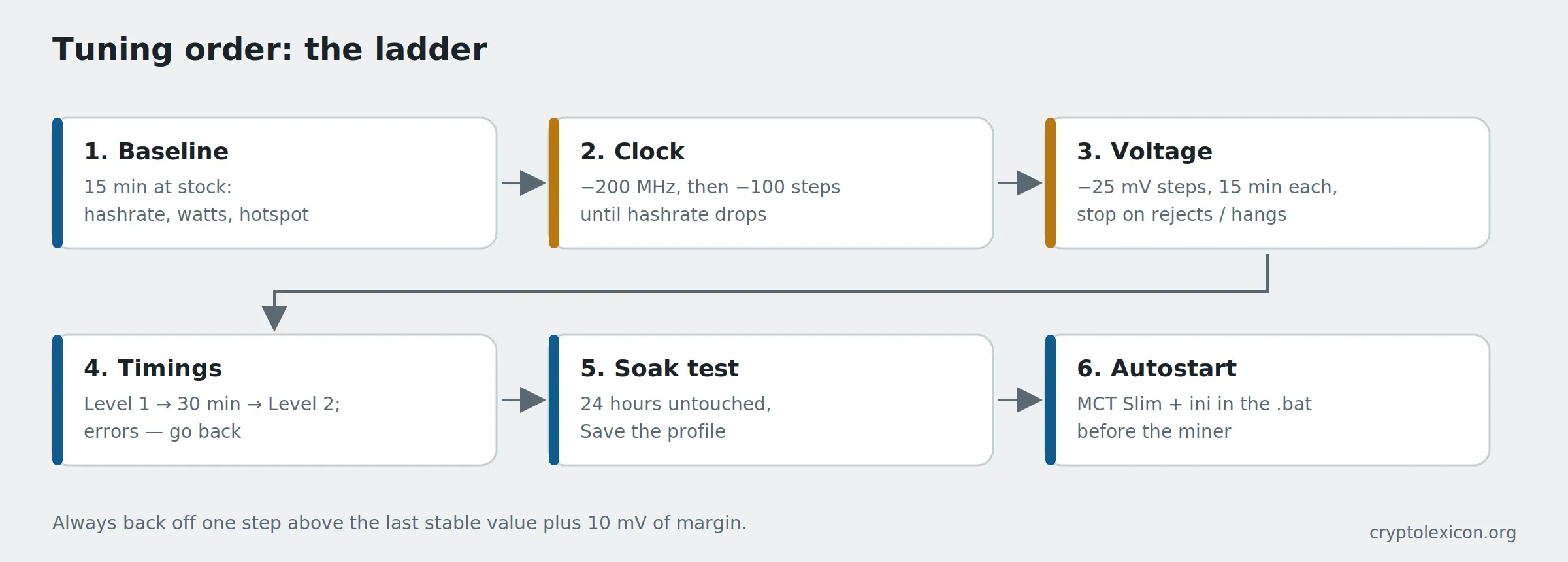
On RX 6000/7000/9000 MoreClockTool is what flashing was on Polaris: the only way to set clock, voltage and timings as numbers and keep them as a profile. The order never changes: baseline → clock step by step → voltage in steps → timings → 24-hour test → MCT Slim in startup. There are no ready "best values" — igor'sLAB deliberately does not publish them, and we give starting ranges only.
This material is for informational purposes only and is not financial advice. Overclocking and undervolting are done at your own risk; tool versions and clock ranges are as of September 7, 2026 and may change.