amdvbflash (ATIFlash): how to flash an AMD GPU BIOS for mining
amdvbflash guide: choosing a version, BIOS backup and sources, Polaris timings, flashing one card or a rig, fixing Adapter not found and a black screen.
amdvbflash (formerly ATIFlash; the archives ship amdvbflash.exe and, in older builds, amdvbflashWin.exe) is AMD's command-line utility for reading and writing the BIOS of Radeon graphics cards. Miners use it to flash a modified BIOS with tightened memory timings and lower voltage onto RX 470/480/570/580 and Vega, and on RX 5000/6000/7000 to restore a stock image or cross-flash another vendor's official BIOS. This guide covers which version to use for your card, backup, image selection, timing edits, flashing one card and a whole rig, recovering a bricked card and the common errors.
If your goal is lower power draw or more hashrate on RX 6000/7000, start with MSI Afterburner and overclocking: on those cards flashing gains almost nothing while the risk stays the same. NVIDIA has a different procedure and different limits — see NVFlash and flashing an NVIDIA BIOS.
⚠️ Read this first. Flashing the BIOS voids the warranty with most vendors and, done wrong, leaves the card with a black screen. A power cut or a reboot during the write corrupts the image. Backup first, everything else second. Everything below is at your own risk.
📌 Status as of September 2026: flashing a BIOS for hashrate remains a Polaris- and Vega-era tool. On RX 5000/6000/7000/9000 and any RTX card a modified image will not boot — timings, voltage and power limit are set in software there (MorePowerTool, the driver, miner switches). For those cards amdvbflash is for backup, rollback to stock and cross-flashing an official BIOS only.
What you can flash and what you cannot: Polaris, Vega, Navi
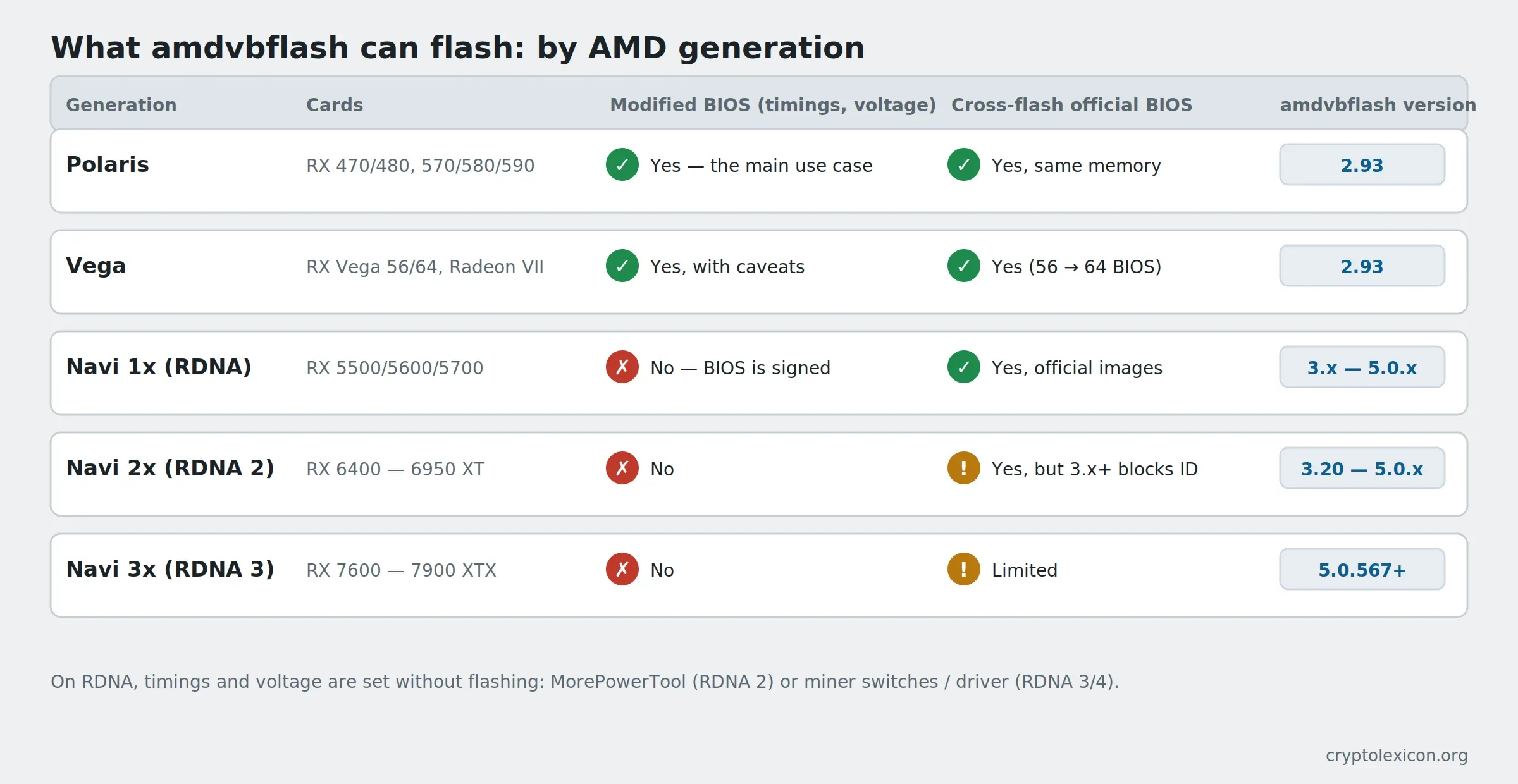
Unlike NVIDIA, where BIOS signing closed the door on modification back at the GTX 900, AMD's line runs between generations:
| Generation | Cards | Modified BIOS | Cross-flashing another official BIOS | amdvbflash version |
|---|---|---|---|---|
| Polaris (GCN 4) | RX 460/470/480, RX 550/560/570/580/590 | Yes, this is the main use case: timings, voltage, clocks | Yes, if memory and board match | 2.93 |
| Vega (GCN 5) | RX Vega 56/64, Radeon VII | Yes, with caveats (PowerPlay table, Soft PowerPlay) | Yes (Vega 56 → Vega 64 BIOS is the classic) | 2.93 |
| Navi 1x (RDNA) | RX 5500/5600/5700 | No: the BIOS is signed, the card rejects an altered image | Yes, official images | 3.x — 5.0.x |
| Navi 2x (RDNA 2) | RX 6400 — 6950 XT | No | Yes, but newer tool builds block ID mismatches | 3.20 — 5.0.x |
| Navi 3x (RDNA 3) | RX 7600 — 7900 XTX | No | Limited | 5.0.567+ |
In practice:
- RX 470/480/570/580 is the card this whole procedure exists for: correctly flashed timings give roughly +15–25 % hashrate on Ethash-style algorithms, the exact number depends on the memory chip.
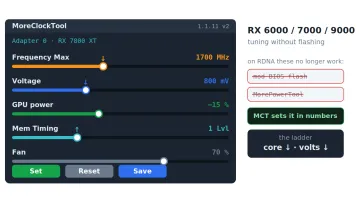
- RX 5000/6000/7000: timings and voltage are set in the driver, not the BIOS. MorePowerTool (MPT) writes a Soft PowerPlay table to the registry, and miners like TeamRedMiner take timing switches. Flashing only makes sense to roll back to stock or to get a higher power limit BIOS from another vendor of the same board.
- Cross-flashing on Navi (say, an XT-variant BIOS onto a non-XT) is blocked by SSID checks in builds 3.x and later. The community uses the old 2.93 for that: it does no checks, and all responsibility is yours.
What you need before you start
- amdvbflash in the right version from TechPowerUp — Downloads → ATIFlash / AMD VBFlash. Do not take archives from forums or file hosts: a tampered flashing tool is a fast way to lose a card.
- A BIOS image (
.rom): stock from your own backup, official from the TechPowerUp VGA BIOS Collection, or your modified one. - GPU-Z to read the Device ID, Subsystem ID, memory vendor and current BIOS version.
- A BIOS editor for Polaris: Polaris BIOS Editor (PBE) 1.7.x or Red BIOS Editor (RBE). For Vega — RBE.
- atikmdag-patcher — after a modified BIOS on Polaris the AMD driver reports Code 43, the patcher fixes that.
- A USB stick or cloud folder for a copy of the backup off the rig.
- A second GPU or integrated graphics — not mandatory, but it makes recovery far easier.
Where to get everything (all tools are free):
| Tool | Source | Purpose |
|---|---|---|
| amdvbflash 2.93 / 5.0.874 | TechPowerUp → Downloads → ATIFlash | Read and write the BIOS |
| VGA BIOS Collection | Same TechPowerUp, VGA BIOS section | Stock images by vendor, model and memory |
| GPU-Z | TechPowerUp | Card IDs, memory type, BIOS version |
| Polaris BIOS Editor 1.7.x | The project repository on GitHub | Timings and voltage on Polaris |
| Red BIOS Editor | The author's site (igor'sLAB) | Polaris and Vega, advanced editing |
| atikmdag-patcher | The project repository on GitHub | Code 43 after a modified BIOS |
We deliberately do not link the editor repositories: projects move, and fake "improved" builds are common. Search by the exact name and verify the author.
📌 Status as of September 6, 2026: the latest build on TechPowerUp is amdvbflash 5.0.874 from November 25, 2025. For Polaris and for cross-flashing you still need 2.93, listed under "Show older versions" on the same page. Check the version and checksum on the download page before downloading.
💡 The newer builds (3.x and 5.x) need their own driver: the archive contains
AMDVBFlashDriverInstaller.exe, and without it the tool will not see the card. Version 2.93 installs its driver on first run. Do not keep two versions installed at once: uninstall the driver with the same.exebefore switching.
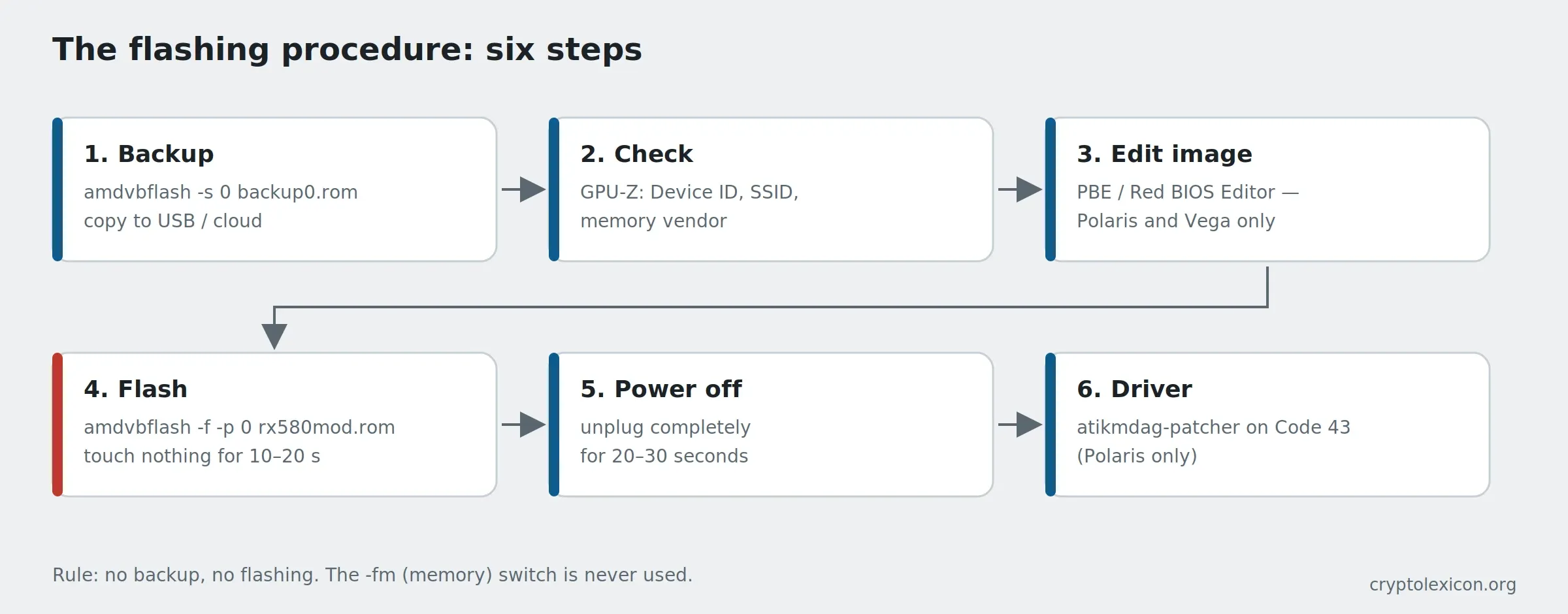
Step 1. Preparation
- Extract the archive to a short path with no spaces:
C:\atiflash. - For builds 3.x/5.x, run
AMDVBFlashDriverInstaller.exeand wait for the install confirmation. - Put the BIOS file in the same folder and give it a short name:
rx580.rom. A typo in the flash command is a real risk; a short name removes it. - Close the miner, MSI Afterburner, HWiNFO, GPU-Z and anything else holding the GPU.
- Open Command Prompt as administrator:
Win + R→cmd→Ctrl + Shift + Enter. - Go to the folder:
cd C:\atiflash
🛡️ Windows Defender may delete
amdvbflash.exeoratikmdag-patcher.exeas potentially unwanted. AddC:\atiflashto the exclusions in advance — the steps are in Windows Defender blocks miners.
Step 2. Identify the cards and back up
First see what the tool detects:
amdvbflash.exe -i
The output is a table of adapters numbered 0, 1, 2… with the Device ID (PCIID), Subsystem ID (SSID), flash chip type and size. Details for one card:
amdvbflash.exe -ai 0
The lines that matter are Bios P/N, Bios Version, Flash Type … (KB) and ROM Image Type — on Navi the image is hybrid (Legacy + EFI), and that matters when choosing a replacement.
Now the backup. Every card, every time, before any flash:
amdvbflash.exe -s 0 backup0.rom
For a six-card rig, six commands with different numbers and file names:
amdvbflash.exe -s 0 backup0.rom
amdvbflash.exe -s 1 backup1.rom
amdvbflash.exe -s 2 backup2.rom
amdvbflash.exe -s 3 backup3.rom
amdvbflash.exe -s 4 backup4.rom
amdvbflash.exe -s 5 backup5.rom
Copy every backupN.rom to a USB stick or the cloud. If a card goes black, this is the only guaranteed way back — and it must not sit on a rig disk that might not boot.
💡 Take the backup with amdvbflash, not GPU-Z: on Navi, GPU-Z sometimes misses the EFI part of the image, and a restore from that file fails.
Step 3. Choose the BIOS: three values that must match
Open GPU-Z and note for the card:
| Value | Where in GPU-Z | If it does not match the image |
|---|---|---|
| Device ID (the chip) | Main tab, Device ID field, e.g. 1002 67DF | Do not flash. An image from another chip will not boot, and -f will not help |
| Subsystem ID (board and vendor) | Same field, second part, e.g. 1DA2 E366 | Different VRM and layout. On Polaris 2.93 will write it, but the card may not start or may fail on power delivery |
| Memory vendor and type | Advanced → General → Memory Timings, or the Memory Type line | Do not flash. Samsung timings do not fit Hynix or Micron: the card either fails to start or throws memory errors |
| Flash chip size | amdvbflash -ai N, Flash Type line | The image must physically fit; 256 KB on Polaris, 1 MB on Navi |
Stock images for a specific model live in the TechPowerUp VGA BIOS Collection, filtered by vendor, model and memory type. On Sapphire cards part of the SSID is printed on the P/N sticker — check against it.
⚠️ Important. The most common cause of a bricked Polaris after flashing is an image for the wrong memory. The same RX 580 from the same vendor ships with Samsung, Hynix or Micron in different batches. Go by the memory line in GPU-Z, not by the model name.
Step 4. Editing timings on Polaris
If you are flashing a ready-made modified image from a trusted source, skip this step. If you are making your own:
- Open
backup0.romin Polaris BIOS Editor 1.7.x. - Click One click timing patch: the editor copies the timing strap from 1500 MHz (1750 in some versions) to all higher frequencies. That is 90 % of the "mining mod".
- Optionally lower the GPU clock to 1150–1200 MHz and the VDDC table to 850–900 mV — exact values are per chip, start conservative.
- Save as
rx580mod.rom. PBE recalculates the checksum itself.
Red BIOS Editor does the same and more (manual strap editing, PowerPlay, fans) but requires understanding what you change.
💡 Do not paste someone's "best timings" from a chat into your BIOS: they were tuned for a specific chip and are often unstable. The one-click patch plus a careful undervolt is more stable and delivers nearly the same result.
Step 5. Flashing
The basic command is the adapter number and the file:
amdvbflash.exe -p 0 rx580mod.rom
The tool compares the IDs of the image and the card. If they match, it writes and ends with VBIOS was programmed successfully. If not, it reports the error and refuses. The force switches:
| Switch | What it bypasses | When acceptable |
|---|---|---|
-f | The general compatibility check | Modified image on Polaris/Vega |
-fa | The Asic ID check | Cross-flash within the same chip |
-fp | The board P/N check | Another vendor's official BIOS for the same board |
-fs | The SSID check | Same, at a known risk |
-fm | The memory model check | Practically never. Wrong memory type means a dead card |
The typical command for a modified Polaris image:
amdvbflash.exe -f -p 0 rx580mod.rom
Cross-flashing an official image on Navi with 2.93:
amdvbflash.exe -p 0 rx6800xt.rom -fa -fp
If the tool reports ROM not erased or Cannot erase ROM, some cards need write protection lifted first:
amdvbflash.exe -unlockrom 0
While it writes, touch nothing. No reboot, no closing the window, no power cut. Those 10–20 seconds are where bricks happen.
After success — a full shutdown, not a restart: power off, unplug for 20–30 seconds, power on. Then confirm in GPU-Z that the BIOS version changed.
Step 6. Driver and Code 43
After a modified BIOS on Polaris the AMD driver verifies the image signature and disables the card: Device Manager shows "Code 43". The fix is patching the driver:
- Run
atikmdag-patcher.exeas administrator. - Wait for
Found: 1, Patched: 1(or another match count) → Yes. - Reboot.
Repeat the patch after every driver update. It is not needed on Navi: modified images do not boot there anyway, and official ones are signed.
Flashing a whole rig
Flash one card at a time, by adapter number, and only after confirming every card has the same memory. If the rig mixes Samsung and Hynix, you need two images, and mixing them up is not an option.
amdvbflash.exe -i
amdvbflash.exe -f -p 0 rx580mod.rom
amdvbflash.exe -f -p 1 rx580mod.rom
amdvbflash.exe -f -p 2 rx580mod.rom
Slow, but an error costs one card instead of six. Adapter numbering does not always follow slot order on the board: match by SSID and memory type from -i, not by riser position.
💡 Do not run an "all cards at once" .bat script before a successful manual pass. The script will not stop on an error and will run to the end even if the first card already refused the image.
Recovery: black screen after flashing
If the system does not start with the flashed card, or the screen is black, the card is usually still alive. In order:
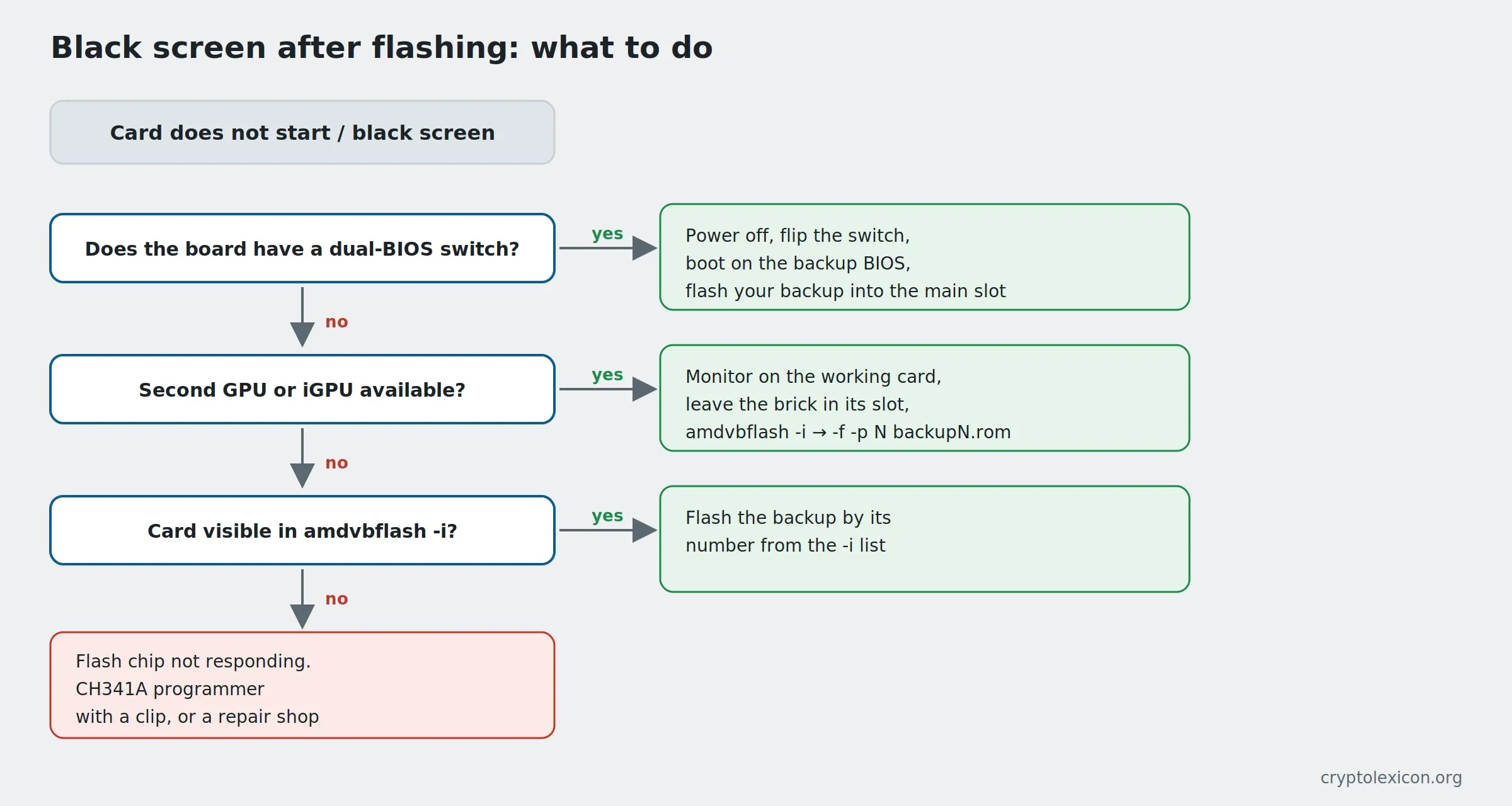
1. The BIOS switch. Sapphire Nitro, MSI Gaming, XFX and many other Polaris cards have a dual-BIOS toggle near the edge of the board. Power the rig off, move the switch to the other position, boot on the backup image, flash your backup into the main slot, move the switch back. This is the fastest route.
2. A second card or integrated graphics. Plug the monitor into the iGPU or any working GPU and leave the bricked card in its slot with no cable. Windows boots, the driver will not load on the broken card, but amdvbflash sees it on the PCI bus:
amdvbflash.exe -i
amdvbflash.exe -f -p 1 backup1.rom
The number is the one the bricked card shows under in the list. Do not guess: flashing the backup into the wrong card creates a second problem.
3. The card does not appear in -i at all. Then the flash chip is not responding and software cannot fix it. What remains is a CH341A programmer with a clip (the flash chip on Polaris is an ordinary 8-pin SPI part) or a repair shop.
If the miner still will not start after a successful recovery, the causes are covered in miner won't start: 8 causes.
Command cheat sheet
| Command | Action |
|---|---|
-i | List adapters with numbers, IDs and flash chip type |
-ai N | Detailed information about card N |
-s N file.rom | Save the BIOS of card N to a file |
-p N file.rom | Flash the file into card N |
-v N file.rom | Compare the file against the card without writing |
-biosfileinfo file.rom | Show image data: chip, memory, version |
-unlockrom N | Lift write protection on cards that have it |
-f, -fa, -fp, -fs, -fm | Force switches, see the table above |
Syntax differs slightly between 2.93 and 5.x (older builds write some switches without a space, e.g. -p0); on Invalid option, run amdvbflash.exe with no arguments and read the help for your version.
Errors and fixes
Adapter not found / an empty list from -i. The tool sees no card. Check in order: Command Prompt is running as administrator; for 3.x/5.x, AMDVBFlashDriverInstaller.exe is installed; the miner and monitoring tools are closed; your tool version knows your chip (RX 7000 needs 5.0.567, and 2.93 does not see them). If the card is also missing from Device Manager, the problem is the riser, power or slot.
SSID mismatch / Subsystem ID mismatch. The image is from another vendor's board. On Polaris, -fp or -fs if memory and layout match; on Navi, builds 3.x+ will not allow it, you need 2.93 and a clear reason.
Memory type mismatch. Stop. The image is for different memory. Find the right one; do not use -fm.
ROM not erased / Cannot erase ROM. Write protection: try -unlockrom N, then repeat -p. On some cards, disabling the adapter in Device Manager before flashing helps.
Code 43 in Device Manager after flashing. The driver rejected the modified image — atikmdag-patcher, see step 6.
The card starts but the miner throws memory errors or rejected shares climb. The timings are too aggressive for this chip. Return a softer strap or raise memory voltage by 10–20 mV; how to tell card problems from pool problems is in rejected shares.
Frequently asked questions (FAQ)
Which amdvbflash version do I need for an RX 580?
2.93. The newer 3.x/5.x builds either refuse a modified image or do not work with Polaris at all. It is under the older versions section on the TechPowerUp page.
Can I flash a modified BIOS onto an RX 6600 / 6700 XT?
No. From Navi onward the image is signed, and a card with an altered BIOS does not start. Timings and voltage on RDNA are set through MorePowerTool or miner switches, without flashing.
How much does a timing flash give on an RX 570/580?
On Ethash-style algorithms, roughly +15–25 % hashrate at the same or lower power; on core-bound algorithms the difference is minimal.
Should I flash a Vega 56 with a Vega 64 BIOS?
That gave a gain in the Ethash era through a higher power limit and memory clock, but the same result now comes from Soft PowerPlay without flashing. If you do flash — only an image with the same memory type (Samsung HBM2 vs Hynix HBM2) and only with a backup.
How do I put everything back?
amdvbflash.exe -f -p N backupN.rom, full shutdown, remove the driver patch (reinstall the AMD driver). That is why the backup comes first.
Where do I download amdvbflash safely?
From TechPowerUp. Any "improved" or "unlocked" builds from forums are at your own risk: this tool has direct access to the flash chip, and a tampered copy is expensive.
Conclusion
Flashing an AMD card is five commands: -i → -s backup → choose an image by memory and ID → -p (with -f for a mod) → full shutdown, plus atikmdag-patcher on Polaris. The hard part is not the commands but the selection: the right tool version for the card generation and the right image for your memory. Check both twice, keep the backup off the rig, and leave the dual-BIOS switch in a position you remember.
No backup, no flashing.
This material is for informational purposes only and is not financial advice. Flashing a GPU BIOS is done at your own risk and may void the warranty; tool versions and gain figures are as of September 6, 2026 and may change.