Antminer kernel log: what the errors mean and what you can fix at home
Antminer kernel log errors — "find 0 asic", "fan lost", sensors, power, EEPROM. What a screwdriver fixes, what needs a bench, chips for S19, S21, L7, L9, KS.
Your miner stopped, the web interface shows zero hashrate, and the kernel log has a line in it that could mean anything. This article is a reference: find your line, learn what it actually means, and work out whether it is a fifteen-minute fix or a trip to a repair shop. The headline point up front — one line in the log can mean five different faults, and half of them have nothing to do with the chips.
📌 Status as of September 2026: chip data and firmware behaviour here apply to the S19, S21, L7, L9 and KS lines. Bitmain reworks log wording between firmware versions, so your exact text may differ by a word or two — match on the key terms, not on an exact string.
Getting the log itself
Do not work from memory or from a single line pulled out of context. The cause is often visible ten lines above the message itself.
Web interface. System → Kernel Log (on some firmware it is Status → Kernel Log or a Log tab). Scroll down — the newest entries are at the bottom. Select everything and save it to a file; a repair shop will ask for it first.
Over the API. The miner exposes a cgminer-compatible API on port 4028. From a machine on the same network:
$c = New-Object System.Net.Sockets.TcpClient("192.168.1.50", 4028)
$s = $c.GetStream()
$b = [Text.Encoding]::ASCII.GetBytes('{"command":"stats"}')
$s.Write($b, 0, $b.Length)
(New-Object IO.StreamReader($s)).ReadToEnd()
$c.Close()
Replace the address with your miner's IP. stats returns per-chain counters, summary gives an overview, devs reports board state. Useful when the web UI is sluggish or you run more than a few machines. If you do not know the miner's IP, find it with a subnet scan — the steps are in BTC Tools: find your ASIC on the network.
💡 Before diagnosing, write down the model from the sticker and the board revision if it is visible. Bitmain ships several revisions under one name, and "S19 Pro" and "S19j Pro" are different hardware.
Quick table: what the line means
| Log line | What it means | Fixable at home? |
|---|---|---|
Chain X find 0 asic | The board is not answering at all | Sometimes — the ribbon |
Chain X only find N asic | The chain broke at chip N | No |
read temp sensor failed | Temperature sensor unreadable | No |
temp lost / read temp error | Sensor answers, values are nonsense | No |
power voltage can not meet the target | PSU cannot hold voltage under load | Often yes |
error power lost | Board lost power | Often yes |
error fan lost / no fan find | Fan not spinning or no tach signal | Yes |
load eeprom error | Board EEPROM unreadable | No |
hash board code is inconsistent | Boards from different revisions mixed | Yes, by swapping |
Socket connect failed | Cannot reach the pool | Yes |
network connection interrupted | Link between miner and pool dropped | Yes |
refresh screen failure | Service indicator glitch | Usually ignored |
The main ones are broken down below.
find 0 asic — the most common and the most misread
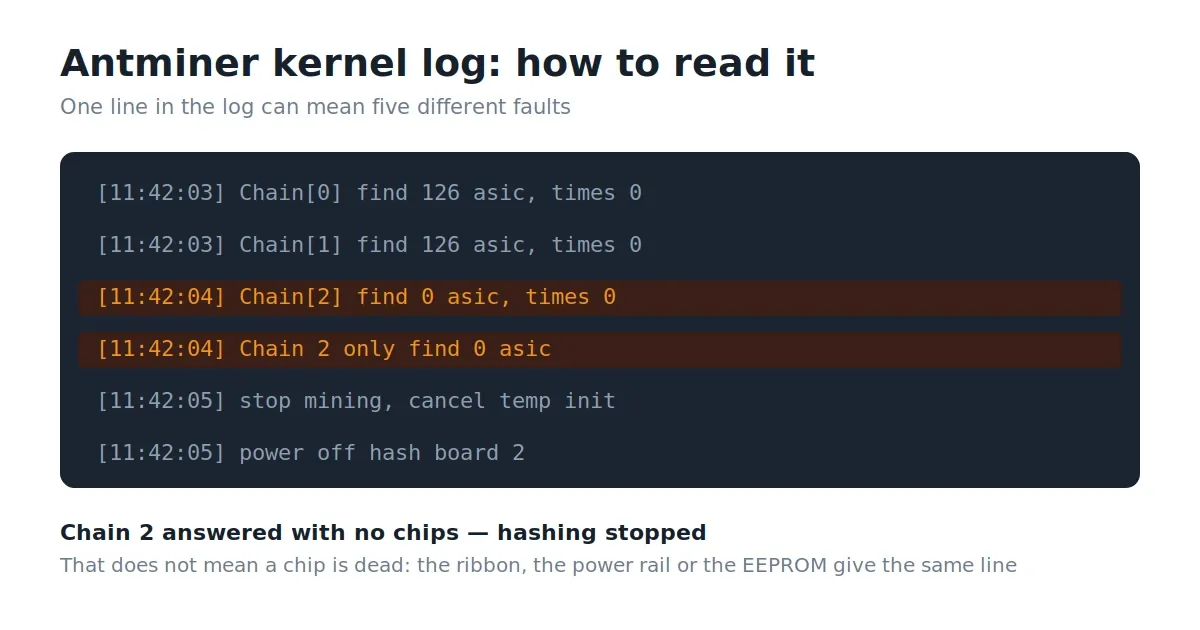
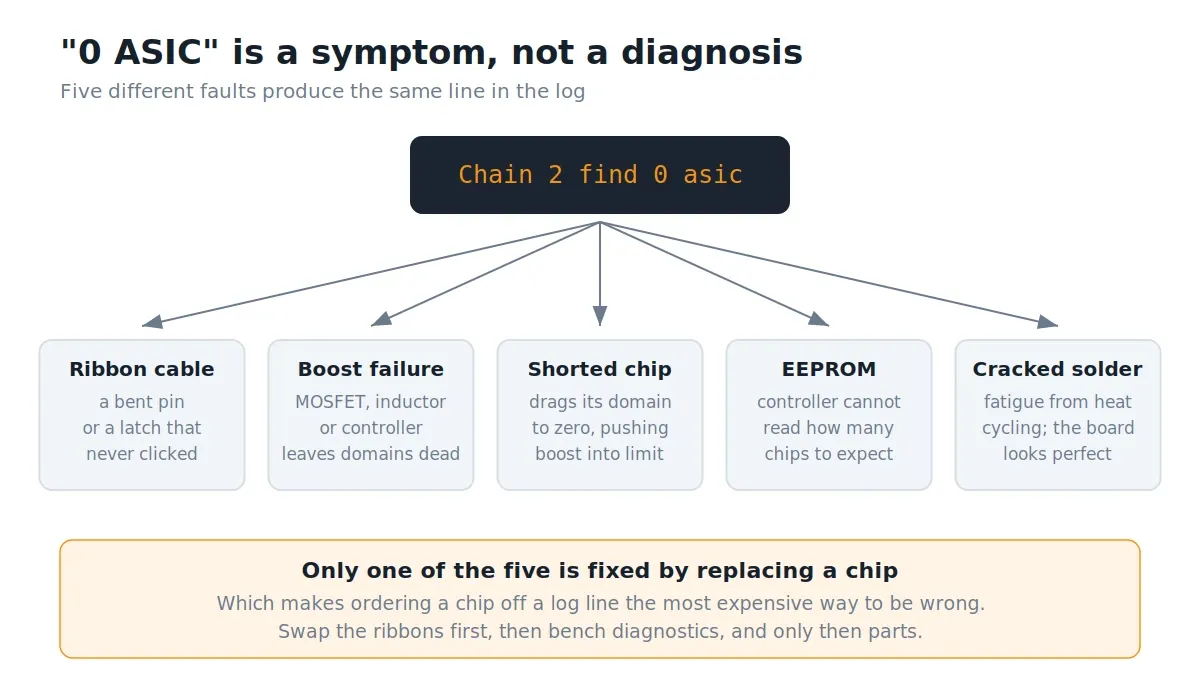
The line reads Chain 2 find 0 asic or Chain[2] only find 0 asic. It means exactly one thing: the control board addressed the hashboard and got no response from any chip. The miner then stops hashing, stops reading temperature and cuts power to that board.
The widespread mistake is reading this as "a chip died" and ordering a replacement. The same line is produced by:
- The ribbon cable or connector. The 18-pin ribbon carries 3.3 V, ground, transmit and receive lines, reset, and the temperature sensor bus. One bent pin or a half-seated latch kills the whole chain.
- Boost circuit failure. A dead MOSFET, inductor or boost controller means no domain gets its rail, and the chips are simply not powered.
- One shorted chip. A chip shorting internally drags its domain toward zero and pushes the boost into current limit. That is why a short in one chip reads as "0 ASIC" rather than "124 of 125".
- EEPROM. If the controller cannot read the board's configuration, it does not know how many chips to look for.
- Cracked solder. A miner that has cycled hot and cold for years accumulates solder fatigue. The board looks perfect.
The one check worth doing yourself
There is exactly one test worth running at home, and it answers the question that matters — is it the board or the controller?
Step 1. Power off and unplug. Give the capacitors a minute.
Step 2. Find the ribbon connectors on the control board, labelled CH0, CH1, CH2. Note or photograph which ribbon goes where.
Step 3. Swap the ribbon of the failing chain with one from a known-good chain. If the error is on Chain 2, swap the Chain 1 and Chain 2 ribbons.
Step 4. Power up, wait for initialisation, open the log.
Read the result:
- The error moved to a different chain number — the hashboard is at fault. It goes to a repair shop, and there is nothing more you can do at home.
- The error stayed on the same number — the ribbon or the controller port is at fault. A replacement ribbon costs almost nothing and fixes a meaningful share of cases.
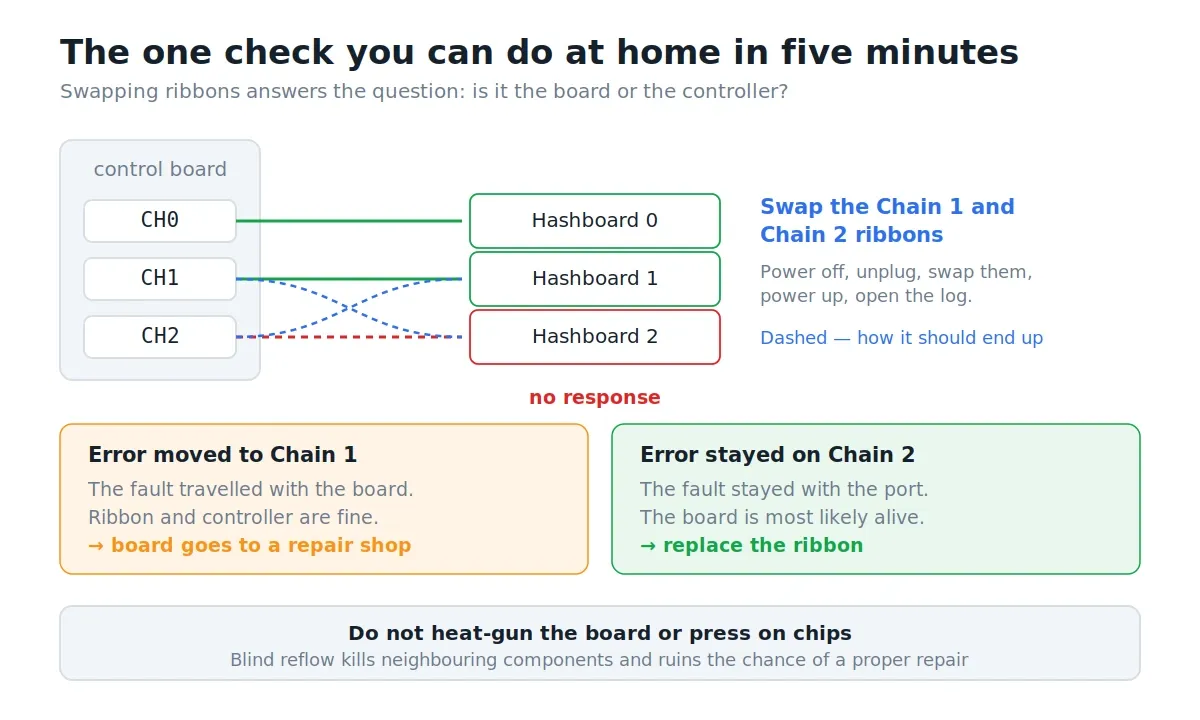
⚠️ Important. Do not heat-gun the board "to reflow it" and do not press on chips. Blind reflow kills neighbouring components and voids your eligibility for a proper repair, and an overheated board can pass a bench test and die under load a day later.
only find N asic — a broken chain
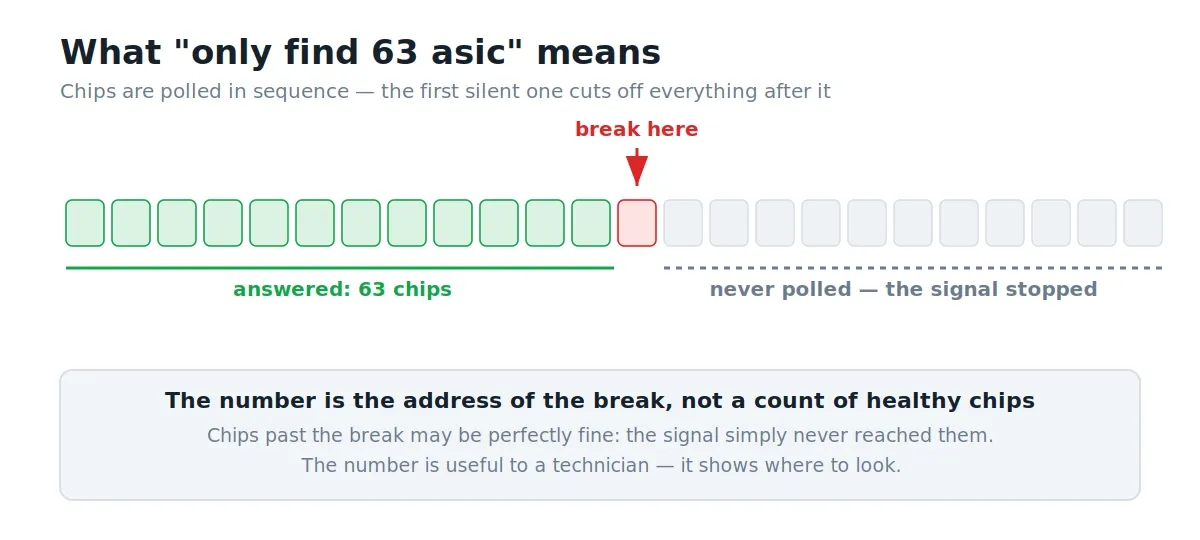
If the log shows a number rather than zero (only find 63 asic where 126 is expected), the chain broke at that chip. Chips are polled in sequence and the signal is passed along, so the first chip that fails to answer takes out everything after it. The number in the log is the address of the break, which is useful to a technician: that is roughly where to look.
Temperature sensor errors
Lines: read temp sensor failed, read temp error, temp lost, do not read out ASIC NN temperature.
Temperature sensors sit next to specific chips on the board and talk to the controller over the same bus that runs through the ribbon. A miner without a valid temperature reading refuses to run, and that is correct behaviour — the alternative is overheating and fire.
Causes in order of likelihood: the sensor itself failed, the neighbouring chip carrying the bus is damaged, or a wrong sensor profile was left behind by someone else's repair.
Only one thing is checkable at home — whether the board has been repaired before. If you bought the miner used and see a sensor error on a visually intact board, there is a chance the previous owner fitted a different sensor type. Everything else is bench work.
🛡️ Do not disable thermal protection with custom firmware to "make it run". A 3 kW machine without thermal cutoff is not an experiment, it is an ignition source.
Power errors
power voltage can not meet the target, power supply voltage is unstable, error power lost, get power type version failed.
Good news: this is the one group where home repair is genuinely possible and often works.
Check in this order:
- The outlet and the cable. A 3–3.5 kW miner needs proper wiring. A thin extension lead, a power strip or an old socket sags under load, and the PSU honestly reports it cannot reach target voltage. This is the most common cause and it costs nothing to rule out.
- PSU connectors on the boards. Unplug and reseat every power connector. Inspect for discolouration and melting — a blackened connector gets replaced, not cleaned.
- The PSU itself. If you have a second known-good unit of the same model, swap it in. That separates "the PSU died" from "the board is drawing abnormal current".
- Mains voltage. At 200 V instead of 230 V some units will not come up. Measure with the miner running, not idle.
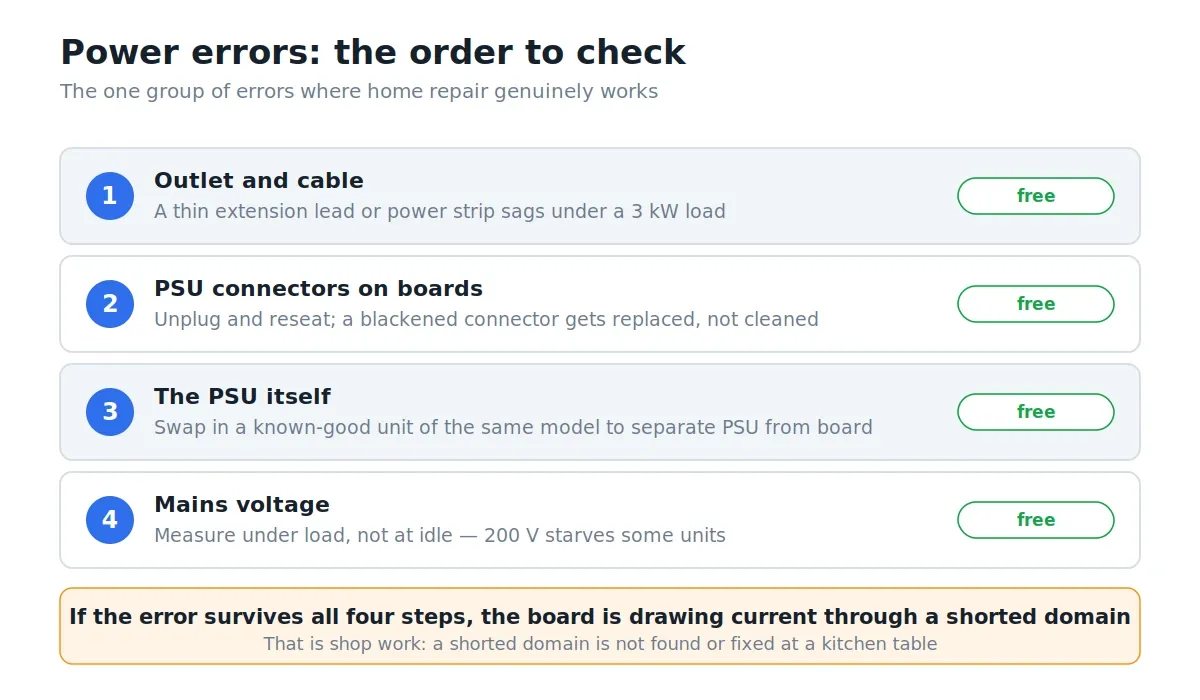
If the error persists after all that and the PSU is known good, the board is drawing current through a shorted domain, and that is shop work.
Fan errors
error fan lost, no 2 fan find, fan speed too low.
The miner counts fans by their tach signal and stops if fewer than expected respond. The simplest group of errors.
- Check the fan physically spins and is not jammed by dust or a cable tie.
- Check the connector: the tach pin corrodes more often than the others.
- Replace with the same size and the same connector type. A fan without a tachometer will not be seen at all, however well it spins.
💡 If you fitted quiet aftermarket fans, they are almost certainly the cause: many consumer models have no tach signal or use a different format. The miner is not being fussy — it receives no signal and counts the fan as absent.
EEPROM and board mismatch errors
load eeprom error, hash board code is inconsistent, ASIC count mismatch.
Each board's EEPROM stores its configuration: chip count, frequencies, revision. The controller reads this at startup.
hash board code is inconsistent means boards from different revisions are installed in one miner. This shows up after repairs or used purchases. The fix is matching boards of one revision — a swap, not soldering.
load eeprom error is either a damaged chip or damaged data. EEPROM recovery is a shop service; it is not solvable at home.
Network and pool errors
Socket connect failed, network connection interrupted, no stratum job.
These have nothing to do with hardware and should not be confused with board faults: the boards are fine, the miner simply cannot reach the pool.
- Check the pool address and port in settings — a single wrong character produces exactly this line.
- Check whether the pool itself is up: try a second server of the same pool in another region.
- Check whether your router blocks outbound connections on the pool's port.
- If the connection drops intermittently rather than entirely, look at the cable and switch — and at your reject rate. Rising rejects on a live connection usually means network latency rather than a miner fault. How to tell them apart is covered in rejected shares.
Which chip is in your model
Useful when a repair shop asks for the chip model or you are estimating repair cost. Bitmain ships several revisions under one name, so read the marking off the actual chip rather than inferring it from the miner's name.
| Model | Chip family | Algorithm |
|---|---|---|
| S21, S21 Hydro, T21 | BM1368 | SHA-256 |
| S21 Pro, S21+, S21 XP | BM1370 | SHA-256 |
| S19 XP, S19 XP Hydro | BM1366 | SHA-256 |
| S19k Pro | BM1366 | SHA-256 |
| S19j, S19j Pro | BM1362 | SHA-256 |
| S19, S19 Pro, T19 | BM1398 | SHA-256 |
| S17, S17 Pro, T17 | BM1397 | SHA-256 |
| S9, S9i, T9+ | BM1387 | SHA-256 |
| L7 | BM1489 / B20 | Scrypt |
| L9 | BM1491AA | Scrypt |
| L3+ | BM1485 | Scrypt |
| KS3 | BM2380AA | kHeavyHash |
| KS5, KS5 Pro | BM2382AA | kHeavyHash |
| KS7 | BM2384BA | kHeavyHash |
| KA3 | BM2110AA | Blake2S |
| Z15, Z15 Pro | BM1746AA | Equihash |
⚠️ Important. A physically similar chip with a different suffix is not a substitute. A revision mismatch produces unstable hashrate, domain errors, and a board that passes a bench test then dies under real load. If you are sourcing chips yourself, match the marking on the board character for character.
What to send a repair shop
To avoid shipping the board twice, include:
- The miner model from the sticker and the board revision if visible.
- The exact error text from the log — pasted, not paraphrased.
- The full log as a file.
- What you already checked, especially the result of the ribbon swap.
- Photos of the board and of the chip marking if it is legible.
Point five saves the most time: from the marking, a technician immediately knows whether the chip is in stock.
When repair is not worth it
Compare the cost of a board repair not against the price of a new miner, but against what this machine will earn before it becomes obsolete. That calculation runs through your electricity rate: an older model with poor J/TH efficiency can be loss-making even in perfect health. How to work out the break-even rate is covered in how to choose an ASIC for your electricity price.
A simple rule: if repairing one board costs more than the machine nets in three months, repair usually does not pay.
Frequently asked questions (FAQ)
One chain shows 0 ASIC. Can I mine on the remaining two?
Most stock firmware halts hashing entirely when a chain fails. Some custom firmware will run on the remaining boards, but you get roughly two thirds of the hashrate at nearly unchanged fan and controller draw — the economics degrade faster than the hashrate does.
Will reflashing fix a "0 ASIC" error?
No. This is a hardware fault: the controller receives no response from the hardware. Firmware cannot manufacture a response that does not exist. The one exception is if incompatible custom firmware was flashed before you got the miner, in which case returning to stock sometimes helps.
It worked, I moved it, and now there is an error. Coincidence?
Almost certainly not. Transport is a classic cause: ribbons work loose from their connectors, and a board with solder fatigue finally cracks from vibration. Start by reseating every ribbon and power connector.
What does the chip number in only find 63 asic mean?
The location of the break. Chips are polled in sequence and the first non-responding chip cuts off everything after it. The number is the address where the signal stopped, not literally the count of healthy chips.
Can I clean a board with water or alcohol?
Isopropyl alcohol and a soft brush, yes — on a fully de-energised, cooled board, followed by complete drying. Water, drain cleaner and an ultrasonic bath without experience, no. Corrosion from poorly rinsed residue shows up weeks later and looks exactly like chip failure.
How long does a hashboard last?
It depends on conditions more than on the model. The main killers are dust, humidity, voltage spikes and power cycling. A miner in a clean room that never switches off lasts noticeably longer than one run on a night tariff.
This material is for informational purposes only and is not financial advice. Opening a miner is done at your own risk and generally voids the manufacturer's warranty. Chip data is current as of September 7, 2026 and may differ for individual board revisions.